Start for free

Book a demo
urecruits
urecruits
Try It FreeSign in

AI Pre-Screening: Interview Every Candidate Without Lifting a Finger.

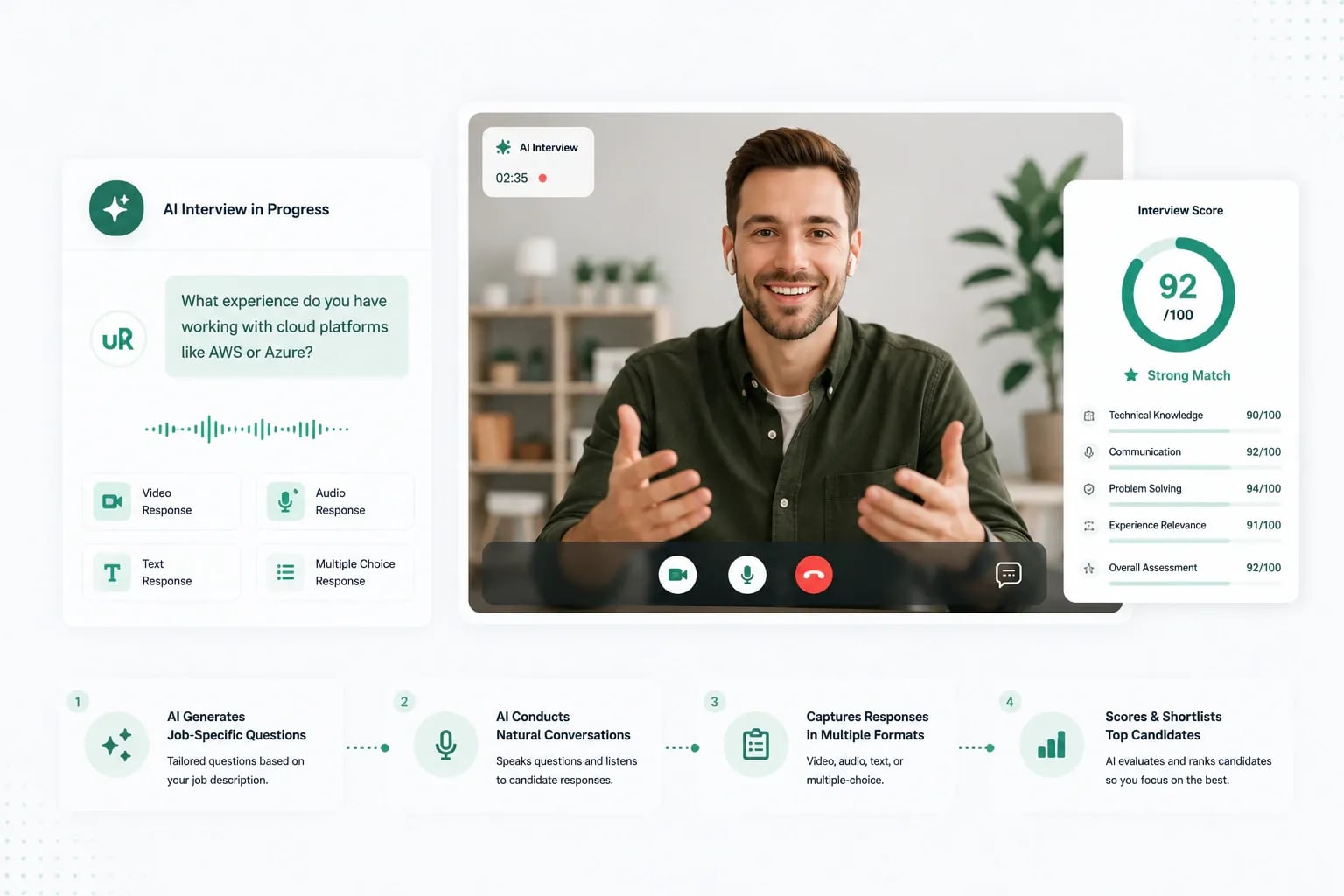
uRecruits' AI Pre-Screening conducts fully automated video interviews. The AI generates job-specific questions, speaks them aloud to candidates in a natural voice, captures their answers across video, audio, text, or multiple-choice, and scores every response, so your team only spends time on candidates who've already proven themselves.

AI Pre-Screening: Interview Every Candidate Without Lifting a Finger.

A Complete First-Round Interview: Run by AI, Reviewed by You

AI Pre-Screening is a new kind of hiring round inside uRecruits. The AI builds the questions, conducts the interview, records everything, transcribes the answers, scores each response, and hands your team a fully-scored candidate profile with audio, video, and AI feedback attached. You stay in control of every decision, the AI just removes the grunt work between 'applied' and 'ready to interview.'

The Interview Bottleneck Is Killing Your Hiring Speed. AI Pre-Screening Fixes It.

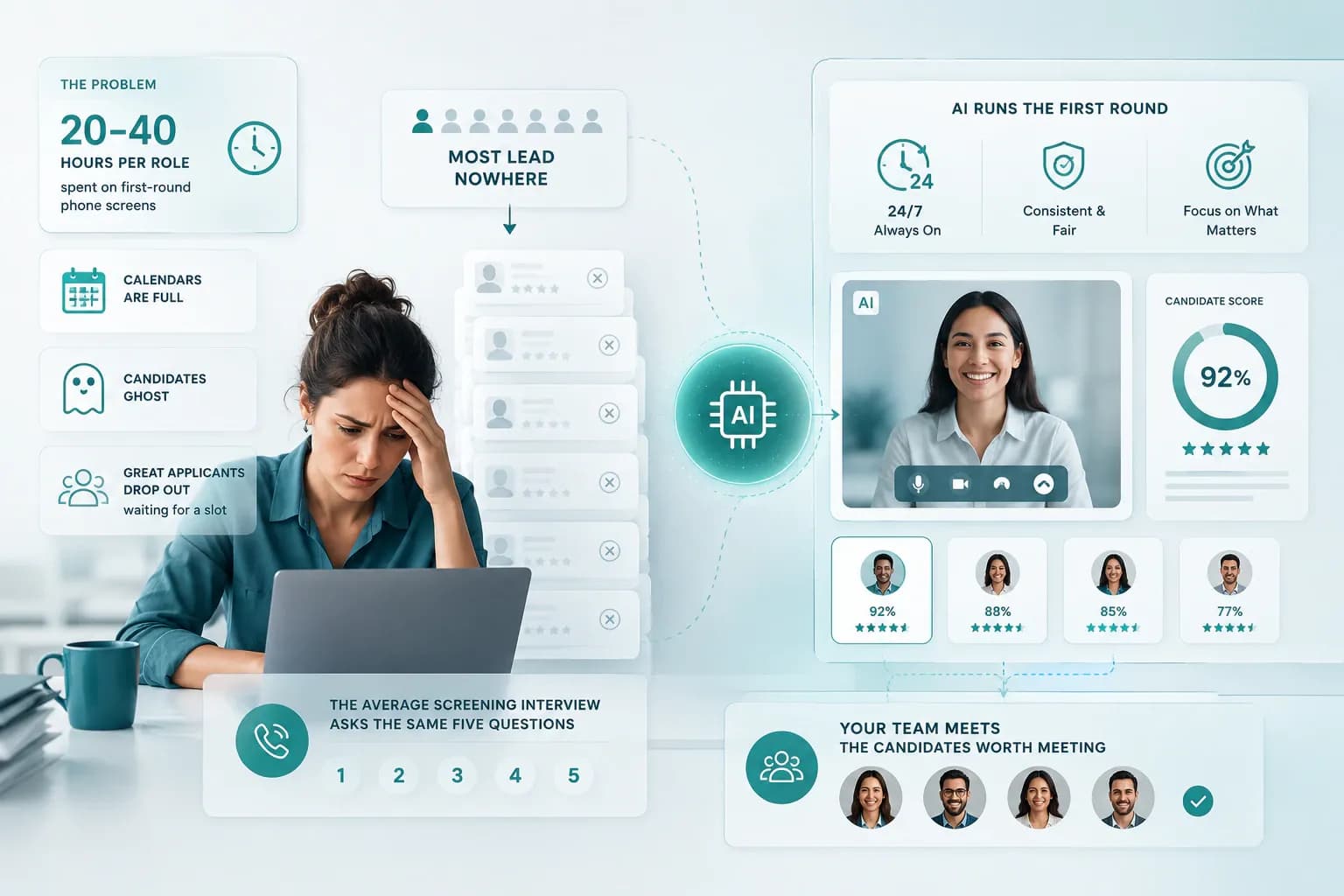
For every open role, recruiters and hiring managers spend 20–40 hours conducting first-round phone screens, most of which lead nowhere. Calendars are full, candidates ghost, and great applicants drop out waiting for a slot. Meanwhile, the average screening interview asks the same five questions every time. There's a better way: let AI run the first round consistently, fairly, and 24/7, so your team only meets the candidates worth meeting.

The Interview Bottleneck Is Killing Your Hiring Speed. AI Pre-Screening Fixes It.

Built to Replace the First-Round Screen Completely

Every feature of AI Pre-Screening is designed to remove a manual step from your hiring process while keeping the experience human for candidates and accountable for recruiters.

AI-Generated Questions From the Job Description

AI reads your job description and generates 8–10 tailored interview questions in under 10 seconds. Recruiters can edit, add, or remove any question before publishing, full control, zero blank-page syndrome.
Natural AI Voice Interviewer

Powered by OpenAI's text-to-speech, the AI interviewer speaks each question aloud in a clear, natural voice. Candidates feel like they're in a real conversation, not filling out a form.

Four Flexible Answer Types

Mix and match question formats: video for communication roles, audio for quick verbal answers, text for written reasoning, MCQ for knowledge checks. One interview can use all four.

AI Scoring & Feedback

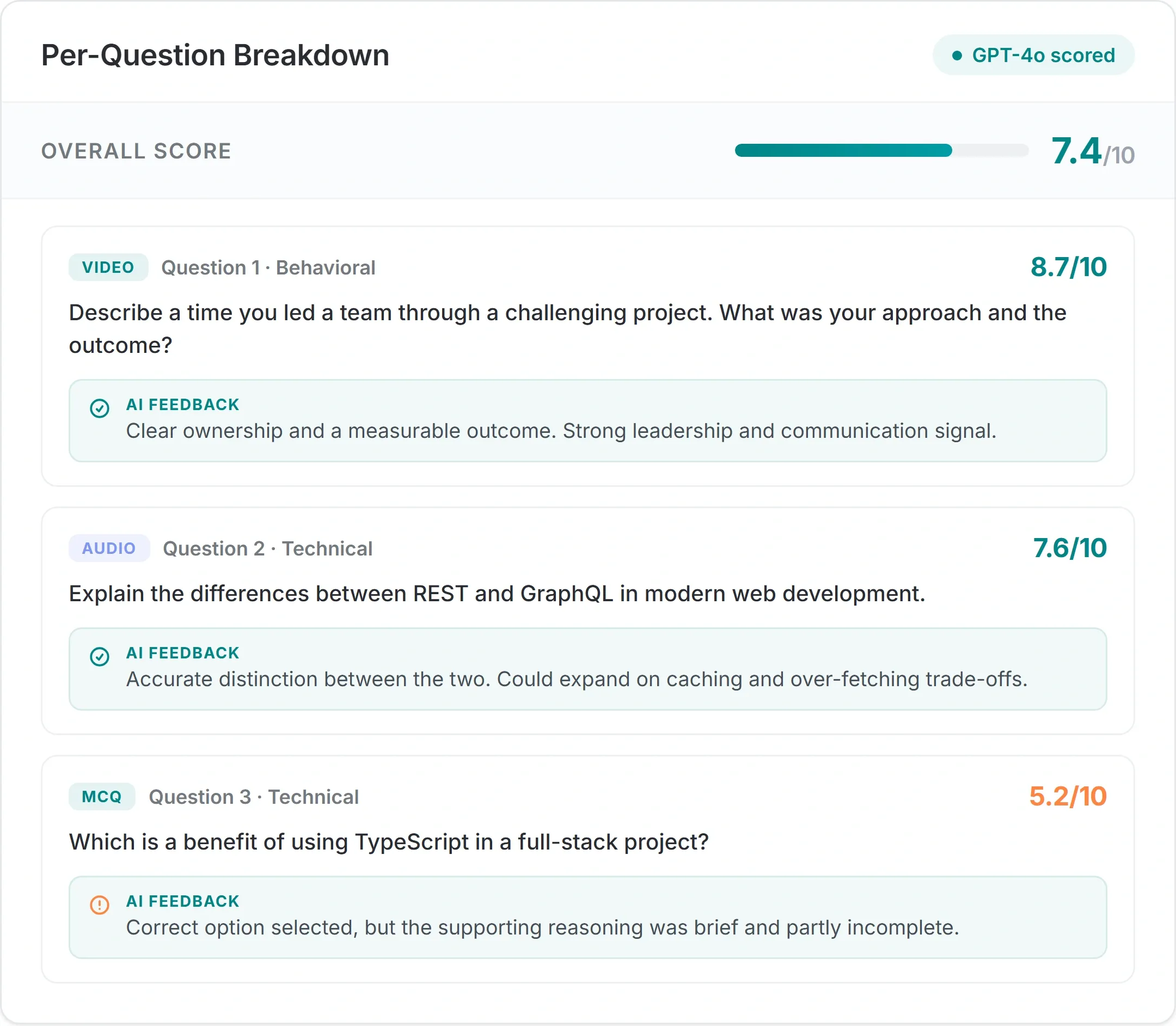
Every answer is automatically transcribed via Whisper and scored on a 0–10 scale, with written AI feedback explaining the score. Recruiters see exactly why each candidate ranked where they did.

Built-In Integrity Monitoring

Tab-switch detection, single-tab session lock, voice activity detection, and full session recording protect interview integrity without making candidates feel surveilled.

Automated Workflow Integration

AI Pre-Screening plugs directly into your hiring workflow. Invites send automatically when a candidate enters the round, and results sync back to the pipeline the moment scoring completes, no manual coordination needed.

From Job Description to Scored Candidates in 4 Steps

Setting up AI Pre-Screening takes minutes, not hours. Here's the full recruiter workflow.

  • Generate Questions

    Click 'Generate Questions with AI' inside any job. AI reads the job description and creates 8–10 role-specific interview questions in under 10 seconds.

  • Customize & Publish

    Edit any question, change its type (video, audio, text, or MCQ), set time limits, add MCQ options and correct answers, configure the 30-minute interview duration and 48-hour link expiry. Hit publish when ready.

  • Invite Candidates

    Add AI Pre-Screening as a round in your workflow and invites send automatically when candidates enter that stage. Or send manual invites in bulk to applied candidates anytime.

  • Review Scored Results

    Get an email the moment scoring completes. Open the results screen to see overall score, per-question scores, AI feedback, full transcripts, and audio/video playback, then advance, hold, or reject with one click.

A Smooth, Professional Experience for Every Candidate

Candidates take their interview on their schedule, from any device with a camera and microphone. The experience is designed to feel modern, fair, and stress-free.

  1. 1
    Step 01 of 05

    Open the Invite

    The candidate opens the secure link from their invite email, which stays valid for a full 48 hours, so they can begin whenever the timing suits them best.

  2. 2
    Step 02 of 05

    Device Check

    A quick guided check confirms the camera and microphone are working. They can't begin until both pass, so there are no surprises once the interview starts.

  3. 3
    Step 03 of 05

    Take the Interview

    The AI greets the candidate and reads the first question aloud. They answer by speaking, typing, or selecting, while a progress bar and timer keep them oriented.

  4. 4
    Step 04 of 05

    Advance or Submit

    Candidates click 'Next Question' to continue, or it auto-advances after eight seconds of silence. The session submits on its own at thirty minutes or when they finish.

  5. 5
    Step 05 of 05

    Done

    The candidate sees a friendly thank-you screen and can close the tab. Behind the scenes, AI is already busy scoring every answer they submitted.

The Right Format for Every Question

Different questions need different answer formats. AI Pre-Screening supports all four, and you can mix them in a single interview.

Video Responses

Best for · Communication, presentation, customer-facing roles

Candidates record a full video answer right in the browser, no apps or downloads. The complete recording is saved, automatically transcribed, and scored on both what they say and how clearly they say it. It's the closest thing to a live first impression, so you can see how someone communicates and presents before you ever schedule a call.

Audio Responses

Best for · Behavioral questions, situational reasoning

Candidates answer out loud without the pressure of being on camera, which tends to produce more natural, considered responses. Each answer is transcribed by Whisper and scored by AI against your rubric. It's the right fit for behavioral and situational questions, where the reasoning and clarity of thought matter far more than appearance.

Text Responses

Best for · Written communication, technical reasoning

Candidates type their answer within a configurable time limit, just as they would in real written work. Alongside content quality, fluency (words per minute) is tracked so you can gauge how comfortably they put ideas into writing. Ideal for roles where clear written communication and structured technical reasoning are part of the day-to-day.

Multiple-Choice (MCQ)

Best for · Knowledge checks, role-specific fundamentals

Define your options and the correct answer, and every response is auto-graded the moment it's submitted, no manual review required. MCQs are perfect for quickly verifying role-specific fundamentals, compliance knowledge, or technical concepts at the top of the funnel. Mix them with video, audio, or text questions in the same interview for a complete picture.

Questions That Actually Match the Role

Questions That Actually Match the Role

Generic interview templates miss the point. AI Pre-Screening reads the actual job description, title, responsibilities, required skills, and generates questions tailored to that specific role. Hiring a backend engineer? You'll get questions about system design, database choices, and debugging approach. Hiring a sales rep? You'll get questions about objection handling and pipeline management. The AI matches the role.

  • Reads the live job description, title, responsibilities, and required skills
  • Generates role-specific questions, from system design to objection handling
  • Every question stays editable, tweak, reorder, or swap before publishing
Scored Consistently. Every Time. Every Candidate.

Scored Consistently. Every Time. Every Candidate.

Human screeners get tired, distracted, and biased, even unintentionally. AI Pre-Screening uses the same AI scoring rubric for every answer, every candidate, every time. The result: a structured, comparable score for every applicant, with written feedback explaining the reasoning. Recruiters can override any score, but the baseline is fair and consistent across your entire pipeline.

  • The same AI rubric applied to every answer, every candidate
  • Structured, comparable scores with written reasoning for each
  • Recruiters can override any score, the baseline stays fair
Real-Time Recording, Securely Stored

Real-Time Recording, Securely Stored

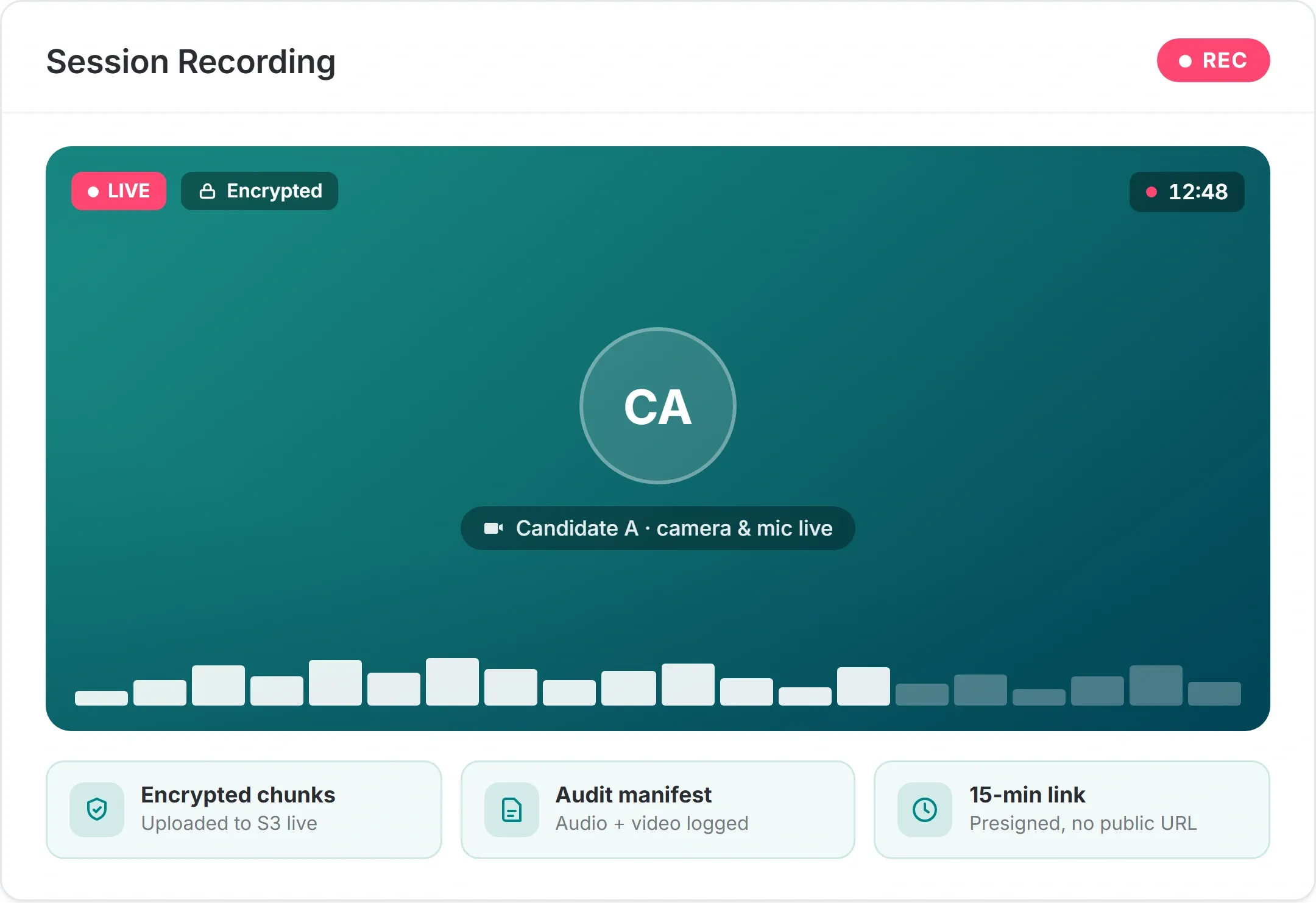
Every session is recorded in chunks and uploaded directly to encrypted S3 storage as the interview happens. Audio, video, and a full audit manifest are stored together. Recruiters get 15-minute presigned URLs to review recordings, no public links, no exposed data. All retention follows your configured policy.

  • Audio, video, and a full audit manifest captured in encrypted chunks
  • 15-minute presigned review links, no public URLs, no exposed data
  • Retention always follows your configured policy
Integrity Without Intrusion

Integrity Without Intrusion

AI Pre-Screening detects tab switches, blocks multi-tab sessions, monitors for silence, and tracks response times, but never feels heavy-handed. Candidates get a clean, single-window interview. Sessions with multiple tab switches or unusual patterns are flagged as INTEGRITY_CONCERN for recruiter review, not auto-rejected. Humans make the final call.

  • Tracks tab switches, multi-tab attempts, silence, and response times
  • Unusual sessions are flagged as INTEGRITY_CONCERN, never auto-rejected
  • Humans make the final call on every candidate
Resumes Just Where They Left Off

Resumes Just Where They Left Off

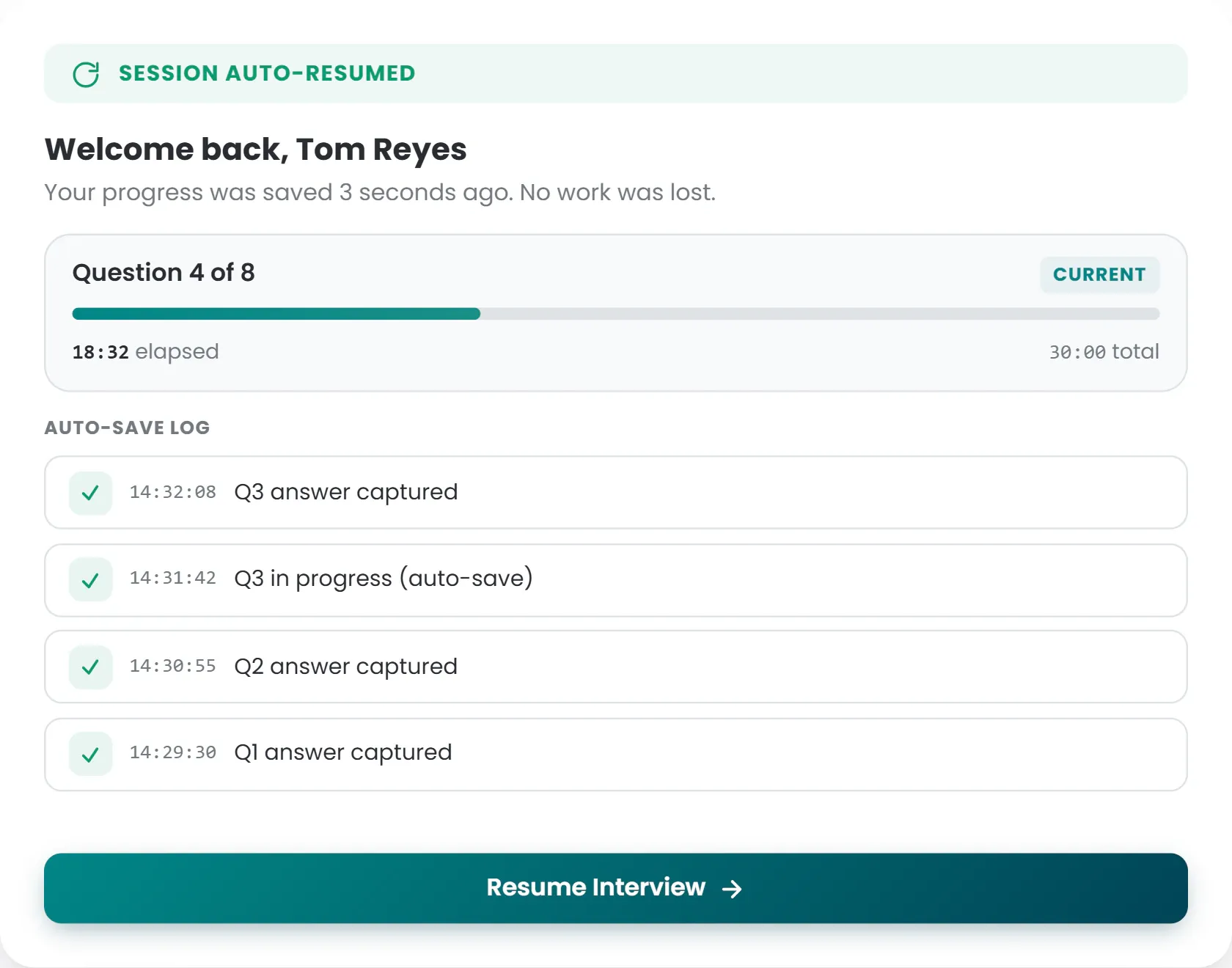
Browser crashes, accidental refreshes, network drops, they happen. AI Pre-Screening saves session state continuously, so candidates resume at the exact question they were on. No restarting. No lost answers. No support tickets.

  • Session state is auto-saved continuously in the background
  • Candidates resume at the exact question after a crash or refresh
  • No restarts, no lost answers, no support tickets

Everything You Need to Make a Decision in One Screen

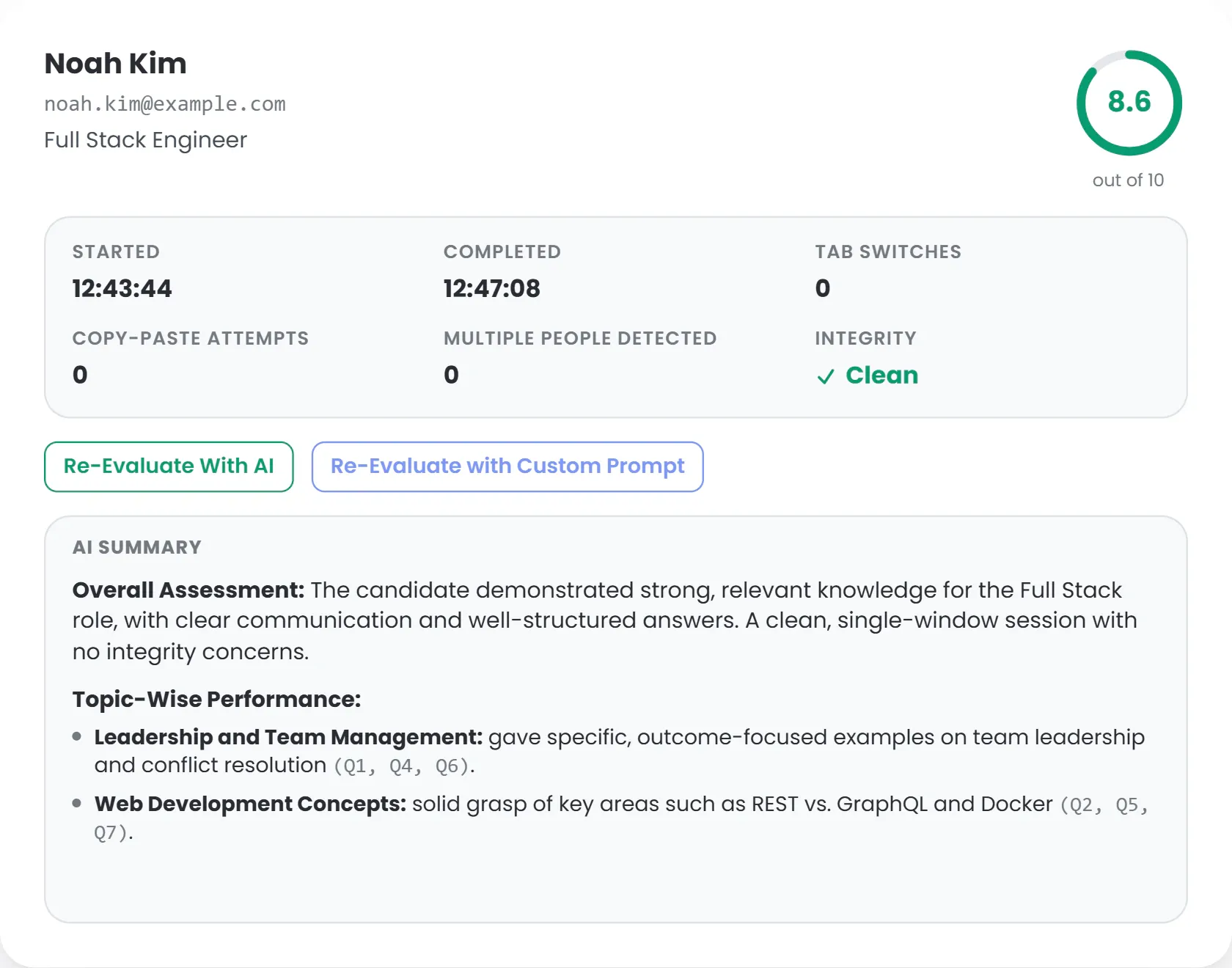
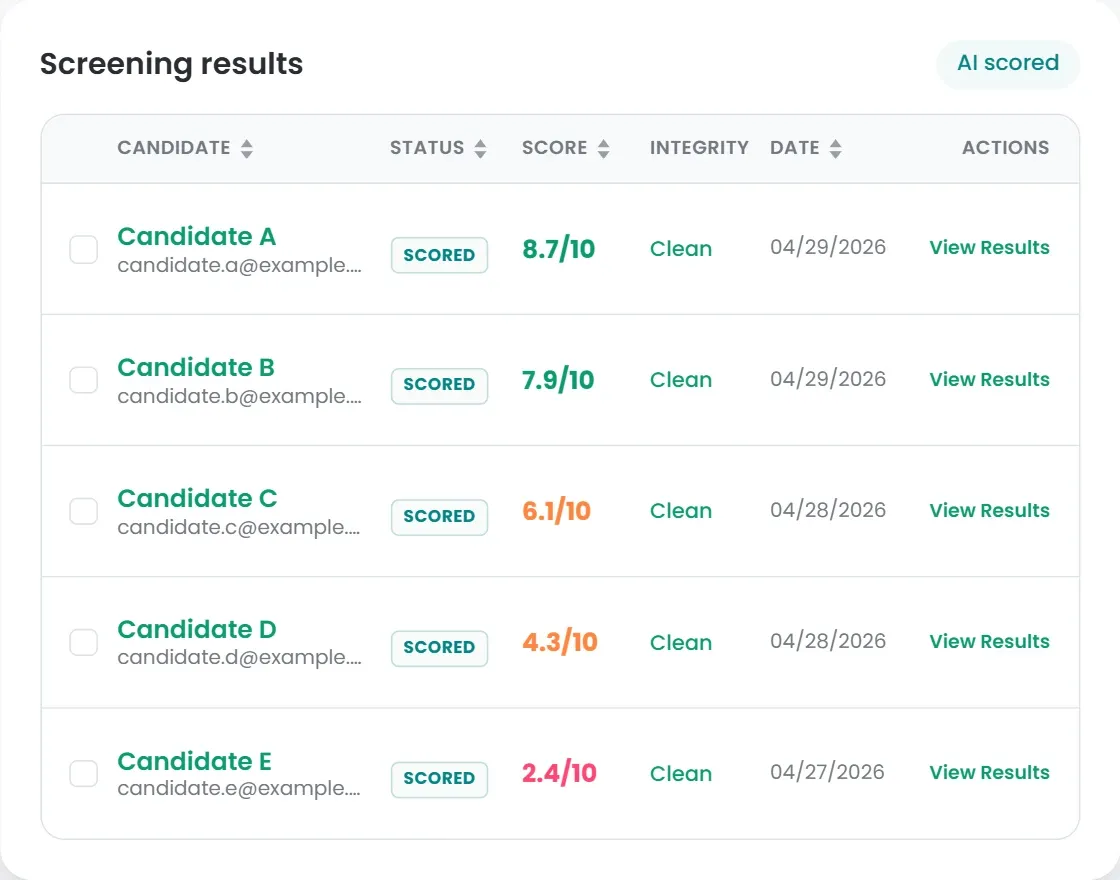
When scoring completes (usually within 30–60 seconds of session end), the results screen gives you a complete picture of how the candidate performed.

Overall Score & AI Summary

A single 0–10 score with a written summary highlighting strengths, gaps, and recommended next steps.

Per-Question Breakdown

Every question, every answer, every score, every piece of AI feedback, laid out in order with full transcripts.

Media Playback

Listen to audio answers. Watch video responses. Review the full session recording. All accessible via secure, time-limited presigned URLs.

Integrity Report

Tab switch count, response times, fluency metrics for text answers, and an overall integrity status.

One-Click Pipeline Actions

Advance to the next round, hold for later review, or reject, directly from the results screen. The hiring workflow advances automatically.

Side-by-Side Comparison

Stack your scored candidates next to each other and compare their scores, answer formats, and integrity at a glance, so you can shortlist and decide in seconds instead of juggling spreadsheets.

Built for Teams Hiring at Volume or Quality

AI Pre-Screening is most valuable when first-round interviews are a bottleneck, but it works for any team that wants consistency at the top of the funnel.

High-Volume Hiring

For sales, customer success, support, retail, or seasonal hiring, screen hundreds of applicants without burning out your team.

Technical Hiring

Combine MCQ knowledge checks with video questions about system design and code reasoning. Pair with live coding rounds for end-to-end technical screening.

Remote-First & Global Teams

Candidates take the interview on their schedule, in their time zone. No more 'let's find a time that works for both of us across three continents.

Lean Recruiting Teams

Small and mid-sized teams that don't have the headcount for hundreds of phone screens. Let AI handle round one so your recruiters focus on the candidates worth talking to.

The Impact of AI Pre-Screening

20+ hrs
Saved per role on first-round screens
<60 sec
Average scoring time after session ends
24/7
Candidate availability, no scheduling
100%
Of candidates screened with consistent criteria

Common Questions About AI Pre-Screening

Yes. Every question is fully editable. You can change the wording, swap the question type, set time limits, add MCQ options, reorder, add new ones, or delete any question before publishing.

The system automatically retries scoring up to three times. If all retries fail, the session is marked EVAL_FAILED and flagged for manual recruiter review, no candidate is left unscored without you knowing.

Each invite is valid for 48 hours by default (configurable). Once they start, they have 30 minutes to complete the full interview (also configurable).

Every question is evaluated against the same rubric for every candidate. Recruiters can override any AI score, and every decision is logged with actor, timestamp, and reasoning. AI pre-screening produces a recommendation score; it does not make hiring decisions. No candidate is auto-rejected. uRecruits is designed with HR and Recruiter-in-loop framing on every AI action. Customers remain responsible for their own AEDT audit obligations under applicable laws including NYC LL144 and similar regulations.

Camera and microphone are required for video questions.

The candidate receives an invitation to complete the pre-screening conversation. They start when convenient on any device. They answer the role's question set across video, audio, text, or multiple choice. The AI processes their responses and produces a recommendation score. The candidate does not see the score. It goes directly to the recruiter.

No. uRecruits does not auto-reject based on AI pre-screening output. The score is a recommendation. The recruiter decides who advances. Every decision is logged with actor and timestamp.

On the AI pre-screening surface as a per-job average score, and on each candidate's Scoreboard as the individual score for the AI pre-screening round alongside every other workflow round.

Yes. Reviewer override is always available. Every override is logged with actor, timestamp, and optional recruiter notes. The recruiter's decision is always the source of truth.

No. uR Position Workflow templates are per-role. A role can include AI pre-screening or skip it entirely. Most teams use it for high-volume roles. Some skip it for executive or referral-heavy roles where it adds less value.

Still have questions? Talk to our team →

Learn More About AI-Powered Screening

Practical guides on running AI-assisted interviews, designing fair rubrics, and getting more signal out of every first-round screen.

See AI Pre-Screening Run on a Real Role

Book a personalized walkthrough. We'll generate AI questions for one of your actual open jobs, run a sample interview live, and show you exactly what your recruiters would see when results come in. No slides, just the real product on your real role.

Live demo · 30 minutes · No commitment
Book a DemoRegister