

Job Scan
Score your resume against a specific uRecruits job posting. The system pulls the job's title, required skills, and description automatically and scores you against exactly what the employer is looking for.
Start for free — see uRecruits in action with a personalized demo
Book a demoUpload your resume and compare it with a uRecruits job or any job description. Get a uRecruits Resume Match Score, a category-level breakdown, matched and missing job-related terms, and suggestions for presenting your existing experience more clearly.
Free · First scan needs no account · Candidate guidance, not an employer hiring score
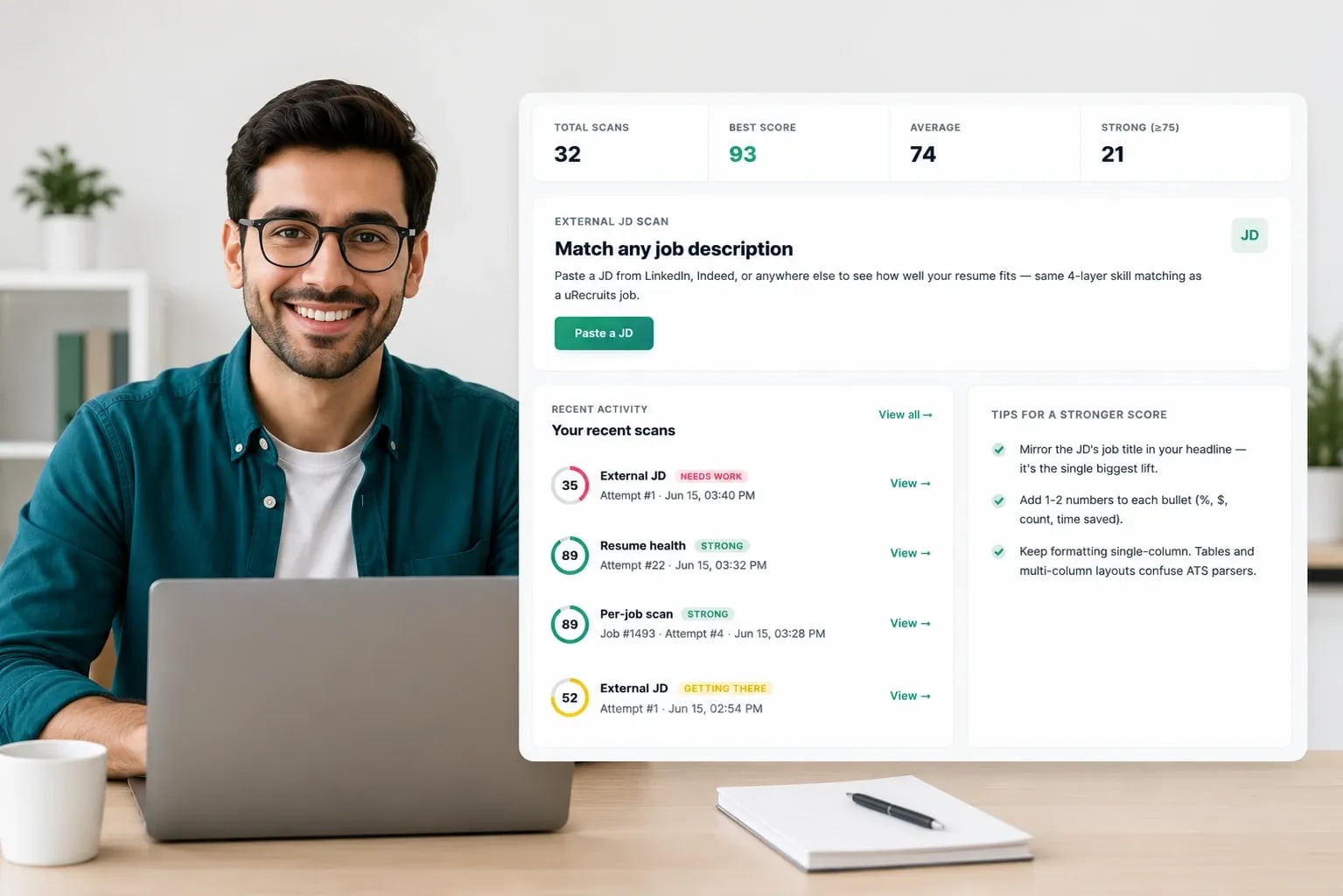
Every scan returns a uRecruits Resume Match Score (0–100), a per-category breakdown, the job-related terms you matched and missed, and suggested edits for your review — so you can decide what to clarify before you apply.
uRecruits Resume Match Score
Compared with: Senior Frontend Engineer
Guidance bands within the uRecruits scoring framework — not employer hiring thresholds, and not a specific employer’s ATS score.
Weighted total:28.8+13.2+13.8+11.4+7.0+4.0= 78.278
Clarify what's already there
Your “Projects” bullet says you built server-rendered pages but never names the tools you used. Naming them makes existing experience findable: “Built server-rendered React interfaces in TypeScript…”
Missing from your resume · Next.js
Next.js appears in the job description but isn’t clearly represented in your resume. If you have relevant Next.js experience, add it to the role or project where you used it and describe what you actually built or supported. The same applies to GraphQL, CI/CD and accessibility.
Keep every resume statement accurate and truthful. Only add a skill, tool, responsibility or result if it reflects your actual background. A missing term is a prompt to check your own experience, never an instruction to claim it.
A resume may undersell relevant experience when important skills are difficult to find, role titles are unclear, formatting is hard to parse, or the language differs significantly from the job description. ATS Resume Score helps surface those gaps before you apply.
Use the report as guidance for improving how your existing experience is presented — not as a prediction of whether an employer will advance or reject you. ATS Resume Score does not reproduce or predict the scoring logic of a specific employer's ATS.
Three stages, one scan — and your first scan needs no account.
We read the actual file data, not just the extension.
Choose a uRecruits job and the title, skills, and description come with it — or paste any JD, or skip it entirely.
Everything you need to fix your resume before you apply, in one screen.
One scan · first scan needs no account · up to five scans in a rolling 24-hour period
Score against a job and your resume is evaluated across six weighted categories, 0–100 each. Every weight is published below, so you can see how each category contributes to your total.
Keyword Match40%
Required hard skills
Title Alignment15%
Your titles vs the role
Formatting15%
Machine-readable structure and layout
Content Quality15%
Bullets, metrics, grammar
Soft Skills10%
Interpersonal requirements stated in the JD
Education5%
Qualification requirements stated in the JD
These weights are the uRecruits scoring framework. ATS Resume Score does not reproduce or predict the scoring logic of a specific employer’s ATS, and the total is candidate guidance rather than an employer hiring threshold.
Before a job-related term is reported as missing, it’s checked through four layers — so abbreviations, synonyms and contextual mentions aren’t missed.
Exact
The term itself, with normalised spelling and casing
Phrase
The term as part of a longer phrase anywhere in your resume
Semantic
Closely related terms, counted at half weight
Role family
AI inference of your resume's role family, used for title alignment and the role-direction signal
The Global Health Scan has no job to compare against, so none of the six job-relative categories above apply. It scores three resume-only dimensions instead.
Content Quality40%
Bullets, action verbs, metrics, grammar
Formatting35%
Layout, structure, readability
Completeness25%
Sections, career progression, skill evidence
Whether you're targeting a specific job, pasting in any job description, or just checking your resume's overall health, ATS Resume Score gives you a clear, actionable report.
Score your resume against a specific uRecruits job posting. The system pulls the job's title, required skills, and description automatically and scores you against exactly what the employer is looking for.
Paste any job description from any source and score your resume against it. Same scoring engine, same depth, works with any role from any company.
No job description needed. With no job to compare against, this scan uses a resume-only model — formatting, content quality and completeness — rather than the six job-relative categories a job scan uses.
How the score is built, what it is for, and what it will never do.
Every category and weight that contributes to your uRecruits Resume Match Score is published on this page, so you can see how each one contributes to your total.
AI writes your improvement suggestions and infers your resume's role family, which drives the role-direction signal and can limit the score shown for a substantially different role family. It never makes an employer's hiring decision.
Your score is candidate guidance. It is not an employer interview threshold, a hiring cutoff, or a guarantee of an outcome — people make those decisions.
Job scans are designed to evaluate resume information against job-related criteria. Protected personal characteristics — age, gender, race, disability and the rest — are not intended to influence your score.
Direct personal identifiers are replaced with placeholders before your resume is sent to an AI provider. uRecruits keeps only the minimum service record the scan workflow requires — the time of the scan and the resulting score, never a copy of your resume — subject to the Privacy Policy.
Under our agreements with our AI providers, your resume content is not used to train their models. It is processed to produce your score and suggestions, and nothing else.
Learn more: Privacy Policy · Security & Privacy · AI Policy
Your resume is personal. Here’s exactly what happens when you scan — and what doesn’t.
Full details: Privacy Policy · Security & Privacy · AI Policy
Checking your score doesn't post your resume, publish a profile, or make anything visible to an employer or recruiter.
Applying joins you to the uRecruits candidate network, where employers and recruiters on uRecruits can discover and contact you about roles. You stay in control: hide your profile, edit what employers see, or delete it at any time.
At upload you’ll see this notice: by scanning, you agree to our Privacy Policy. Direct personal identifiers are masked before your resume reaches an AI provider, which generates your suggestions and does not train on your content. Your raw resume is not retained after the scan session. Scanning is private; applying through the Marketplace is what creates your discoverable profile, which you control anytime.
How the ATS resume checker works, at a glance:
The score calculation uses fixed weights. An AI-assisted role-family check can cap obvious role mismatches at 35.
The ATS resume checker helps anyone who wants to apply with confidence.
Compare your resume with every job you're considering before you apply, then close the gaps you can truthfully close.
See how your resume reads against a role in a new field. The role-direction signal flags when your resume reads as a substantially different role family, with a side-by-side comparison so you can decide what to change.
Run a global health check before your first job hunt. Fix formatting, structure, and completeness issues before recruiters ever see your resume.
Clarify relevant experience, improve formatting, and rescan to see how your uRecruits Resume Match Score changes. Only add skills or experience that truthfully reflect your background.
Your category scores come from a fixed, published weighted framework rather than a per-scan judgement call, so scanning the same resume against the same job description gives you a consistent result. Written suggestions are AI-generated and may vary in wording between scans.
PDF, Word (.docx), PNG, JPEG, and TIFF. The system verifies file type by checking actual file data, not just the file extension.
AI does not make a hiring decision, and it does not produce your category scores — those come from the published weighted framework. AI is used to write your improvement suggestions and to infer your resume's role family, which powers the role-direction signal below. That signal does affect the score you see when your resume reads as a substantially different role family.
When your resume reads as a substantially different role family from the job — a sales resume scanned against a backend engineering role, say — the report shows a Potential Role-Direction Mismatch notice with a side-by-side comparison of your background and the role's requirements, and limits the reported match score to 35. It is a prompt to review the comparison before deciding what to change, not a judgement about whether you are qualified.
Your first scan needs no account. Registered users can run up to five scans in a rolling 24-hour period.
Your raw resume is not retained after the scan session. Direct personal identifiers — name, email, phone and address — are replaced with placeholders before your resume is sent to an AI provider. uRecruits keeps only the minimum service record needed to run the scan and enforce scan limits: the time of the scan and the resulting score, never a copy of your resume. See the Privacy Policy for retention detail.
A job scan pulls the job description directly from a uRecruits posting. An external JD scan lets you paste any job description from any source. Both use the same scoring engine and the same six categories.
Yes. Your first scan needs no account, and the full report — match score, category breakdown, matched and missing job-related terms, and suggested edits — is free. Registered users can run up to five scans in a rolling 24-hour period.
Within the uRecruits scoring framework, a higher score means your resume aligns more closely with the job description you scanned against. The current guidance bands are 75+ Strong Match, 50–74 Getting There, and below 50 Needs Work. These are uRecruits guidance bands — not universal ATS cutoffs, employer screening thresholds, or hiring decisions. A lower score does not mean you are unqualified; use the report to decide what to clarify, then rescan.
Upload your resume as a PDF, Word file or image, pick a uRecruits job or paste any job description, and you get a uRecruits Resume Match Score out of 100 with matched and missing job-related terms and suggested edits for your review. Your first scan needs no account. The score reflects the uRecruits scoring framework — it does not reproduce a specific employer's ATS.
What the score can tell you — and what it can't.
A higher score means stronger alignment with the job description you scanned against. It doesn't guarantee an interview, an offer, or any hiring outcome.
ATS Resume Score uses the uRecruits scoring framework and the job description you provide. It doesn't reproduce or predict the scoring logic of a specific employer's ATS.
It means the resume you uploaded presents less of the job's stated requirements than the framework could find. Use the report to decide what to clarify — the hiring decision is still an employer's, made by people.
AI suggestions are recommendations you choose whether to use. Only add skills, tools, responsibilities or results that accurately reflect your background.
ATS Resume Score is actively developed. Scoring categories, weights and features may change over time; the current weights are always published on this page.
Upload your resume, pick a uRecruits job or paste any job description, and get your match score with a category breakdown, matched and missing job-related terms, and suggested edits for your review. Your first scan needs no account.

