
Every Role Needs a Workflow. Workflow Agent Builds One in Minutes.
Workflow Agent proposes a starting hiring workflow for each role. It selects components from the uR Position Workflow library, sequences them, and recommends gating conditions. You review, modify with drag handles, and publish.
- Connected Hiring Workflow
- uR Position Workflow
- 10-component library
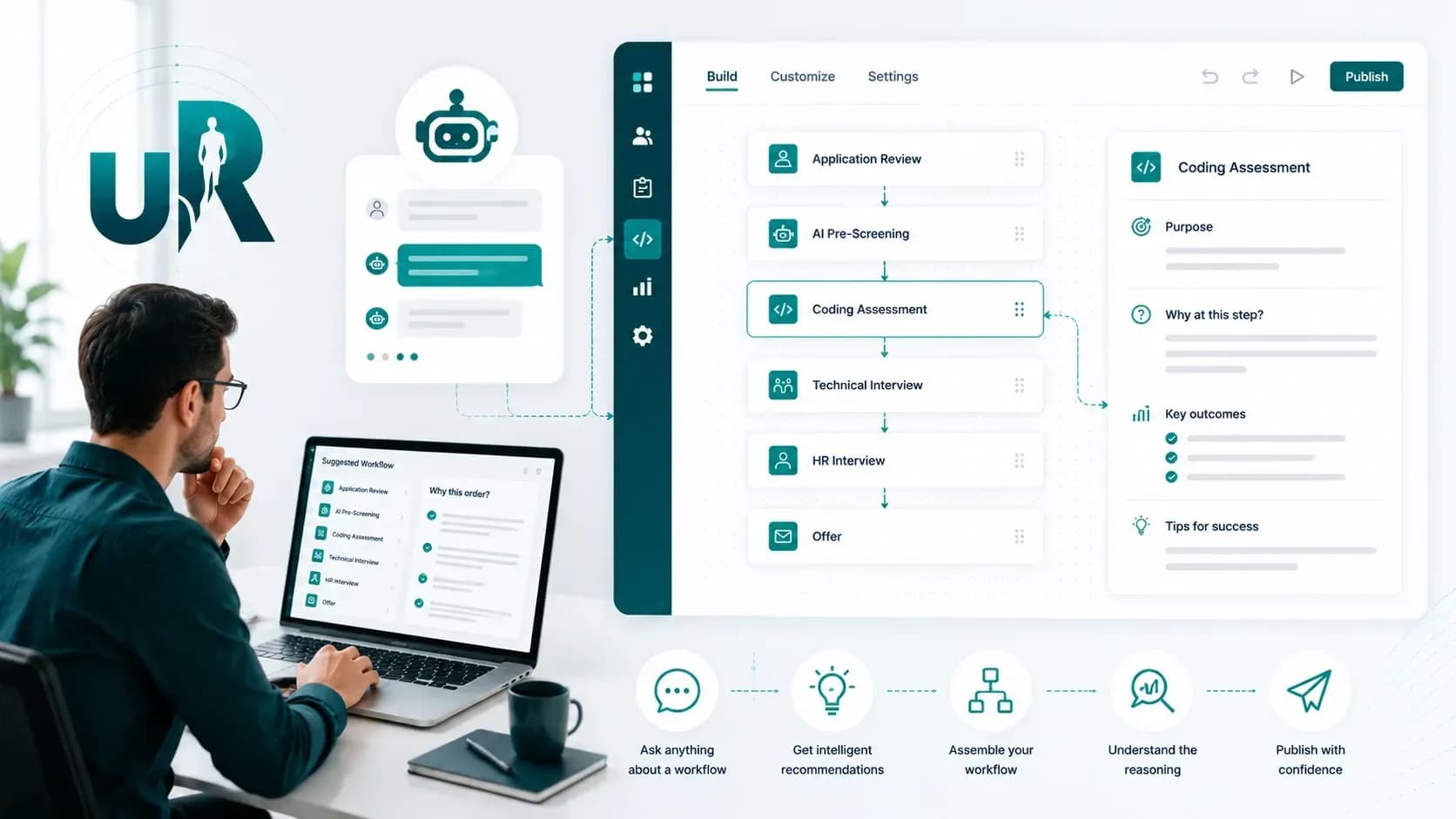
Why designing a workflow per role is hard
Design from scratch, every role
The 10 components in uR Position Workflow can combine in many sequences. A senior engineering role's workflow looks different from a nurse role's, which looks different from a sales director's. Which components belong? In what order? With what gating conditions? Should Background Screening come before Drug Screening or run in parallel? Should the Take Home Coding Assessment come before or after the technical interview? These decisions shape candidate experience, time-to-hire, and screening rigor. But most recruiters do not have the time, or the data, to design an optimal workflow from scratch for every role.
Where this sits in the platform flow
Job Description Creation
You create the role
Workflow Agent
Proposes the workflow
Recruiter review
You modify and publish
Workflow engine
Runs on the durable engine
Workflow Agent proposes the starting design so every role runs on a considered workflow, not a rushed one.
Role Type In. Recommended Workflow Out. Recruiter Owns the Final Design.
The 10 Position Workflow components split into two groups: live, scheduled rounds that need a built-in audio and video room, and async or non-meeting steps. Workflow Agent's sequencing respects that split.
You create a new role
Workflow Agent analyzes the role
Workflow Agent proposes a workflow
You review the proposal
You publish the workflow
You create a new role
Workflow Agent analyzes the role
Workflow Agent proposes a workflow
You review the proposal
You publish the workflow
Drag handles are not decorative
Agent-proposed changes
Workflow Agent also appears in the main uR Agent panel, where a Create Workflow command drafts a workflow you can then open and refine in the builder.
What Workflow Agent recommends by role type
Position Workflow components span the full hiring lifecycle:
- Engineering roles
- Typically get coding assessments, either Take Home or Live Task
- Healthcare roles
- Typically get Background and Drug Screening early
- Sales roles
- Typically lean on Senior HR conversations
- Executive roles
- Often skip pre-screening and lean on multiple interview rounds
Your library may be smaller than this. Background Screening, Drug Screening, and Conditional Offer Letter Generation appear only where your organisation has the corresponding module enabled.
Live vs. async — sequencing respects the difference. Four hiring-workflow components need a scheduled slot and an inbuilt audio/video room — the three interview rounds and the Live Task/Coding Assessment. The two group sessions, Group Audio & Video Interview and Group Onboarding & Training, are booked the same way on the same rooms, for six bookable session types in total; Scheduler Agent handles all of them once a candidate reaches them. Everything else runs asynchronously. A sensible workflow front-loads the async rounds so live panel time is spent only on candidates who've earned it.
A Proposed Workflow Is a Proposal. The Recruiter Owns the Configuration.
Every Workflow Agent recommendation needs recruiter approval before it takes effect.
Agent proposes
Selects components, sets the sequence, and recommends gating conditions
Recruiter reviews and edits
Adds or removes components, reorders with drag handles, and adjusts gates
Recruiter publishes
Runs the workflow on the durable engine. Nothing takes effect without approval
What stays with the recruiter
Which components are included in the workflow
The order of those components
Gating conditions that trigger progression
Cancellation conditions
All progression decisions for in-flight candidates
Audit trail
Every action, from Workflow Agent's recommendation to your modifications to the final publication, is captured in the audit log with an actor and a timestamp.
Why the Workflow Engine Matters
The engine underneath uR Position Workflow is not a simple state machine. It is a durable business-process-management engine, where every step, retry, branch, and decision is captured in a fully replayable audit log. Workflows survive infrastructure events without losing state, and in-progress candidates are not disrupted when templates change for new candidates.
Resequencing is safe
When Workflow Agent proposes a change and you approve it, in-progress candidates continue on their original path while new candidates use the updated workflow
Audit defensibility is built in
Every workflow action is captured with an actor, a timestamp, and Workflow Agent's rationale where it applies, which supports both internal reviews and external regulatory inquiries
What Teams Get From Workflow Agent
Workflow design time
New role workflows configured in minutes, instead of hours of debate with hiring managers
Workflow consistency
Standardized workflows per role type reduce inter-recruiter variability
Sequencing optimization
Time-to-hire compresses as workflows are tuned based on observed patterns
Audit defensibility
Every workflow design decision captured with an actor and a timestamp
* Customer results vary.
Included in your plan
Workflow Agent is included in the Recruitment Package and Full Cycle Package, operating on the Connected Hiring Workflow surface in both.
Workflow Agent FAQs
Yes. Workflow Agent can propose a workflow given a role brief, and it can also modify existing templates based on observed performance patterns.
Yes, always. Every recommendation needs recruiter approval. You can accept, modify, or reject, and the drag handles let you reorder at any time.
In-progress candidates continue on the workflow version they started on, and new candidates use the updated workflow. The durable engine handles version separation safely.
Workflow Agent can consider observed time-to-hire and conversion patterns when proposing changes. Data depth depends on configuration, so confirm with your account team.
Workflow Agent draws on role-type conventions and, where the platform has history, your org's prior workflows. Template-library depth varies by configuration.
The standard model is one workflow per role. Conditional paths, like experienced candidates skipping pre-screening, can be configured through gating conditions, and Workflow Agent can propose such patterns when warranted.
Yes. Four of the 10 components need a scheduled slot and a built-in audio and video room: the HR, Technical and Senior HR interviews, plus the Live Task / Coding Assessment. The other six run async or are non-meeting steps: AI Pre-Screening, Functional / Domain Assessment, Take Home / Coding Assessment, Conditional Offer Letter Generation, Background Screening, and Drug Screening. Workflow Agent's sequencing respects this grouping.
Yes. Modified workflows can be saved as templates for future similar roles, building an org-specific template library over time.
Design a Workflow in Minutes
The next role you open can have a structured workflow proposed in seconds, with components selected, the sequence set, and gating conditions recommended, and you owning the final configuration.
uRecruits provides AI-assist tools to support customer workflow configuration. Customers remain responsible for the workflow designs that govern their hiring processes, including compliance with jurisdiction-specific employment law and any applicable bias-audit requirements.
Workflow Agent assists with proposing workflow configurations. AI outputs may be incomplete or incorrect and require user review. Workflow Agent does not publish workflow changes without recruiter approval.