
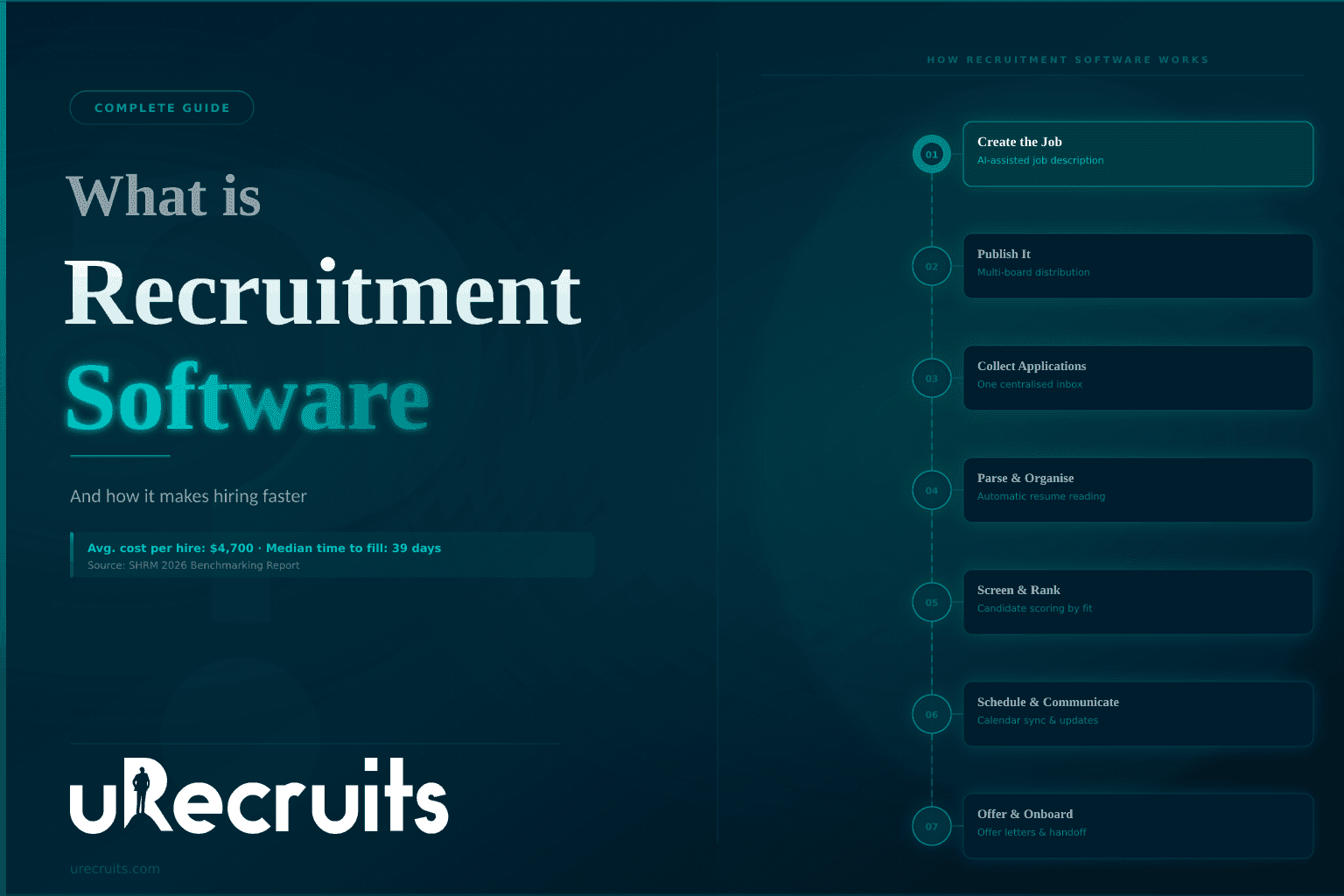
Hiring used to mean job postings on paper, stacks of printed resumes, and a lot of phone tag. That world is gone. Today most companies run their hiring through some form of technology, and for good reason. According to SHRM, the average cost per hire has been benchmarked at nearly $4,700 — and its newest data shows costs still climbing — while its 2026 benchmarking shows the median time to fill a non-executive role has come down to about 39 days. When a seat stays empty that long and costs that much, teams need a faster, more organized way to work. That is where recruitment software comes in.
Hiring is not getting easier, either. SHRM's 2026 research shows that more than two-thirds of organizations still struggled to fill open roles in 2026. That pressure is a big reason so many teams now lean on technology to work smarter.
This guide explains what recruitment software is, how it works, the different types available, the features that matter, and the benefits you can expect. It also covers how to choose the right fit for your team. Whether you are a small business making your first hire of the year or an HR leader running hundreds of openings at once, you will walk away knowing how these tools work and what to look for.
What Is Recruiting Software?
Recruitment software is a digital tool that helps companies find, screen, and hire people. You may also hear it called recruiting software, hiring software, or talent acquisition software. Some people use the term "applicant tracking system" (ATS) to mean the same thing, though an ATS is really just one part of a full recruiting platform.
At its core, recruitment software brings every step of hiring into one place. Instead of juggling a job board here, a spreadsheet there, and email somewhere else, you get a single system that handles job posting, application management, resume review, candidate communication, interview scheduling, and reporting. Modern recruitment software systems also add automation and AI to speed up the slow, repetitive parts of the job.
So when someone asks "what is recruiting software," the short answer is this: it is the central hub that runs your hiring, keeps candidate records in one spot, and helps your team make better decisions faster.
How Does Recruitment Software Work?
Most recruitment software follows the natural path of a hire, from the first job posting to the final offer. Here is how a typical flow looks:
- Create the job. You build a job description, often with templates or AI help, then set the requirements for the role.
- Publish it. The system pushes your opening to job boards, career sites, and social platforms in one action, so you do not have to post to each one by hand.
- Collect applications. Every applicant, no matter which source they came from, lands in one place. No more lost resumes in an inbox.
- Parse and organize resumes. The software reads each resume and pulls out key details like skills, job titles, education, and years of experience, then files them in a clean, searchable format.
- Screen and rank candidates. Based on the job requirements, the system helps you sort and score applicants so the strongest ones rise to the top.
- Communicate and schedule. Automated emails keep candidates informed, and built-in scheduling tools let people book interviews without the back-and-forth.
- Move to offer and onboarding. Once you pick your hire, the software helps with offer letters and hands clean data off to onboarding.
The big idea is that all of this happens inside one connected record. Everyone on the hiring team sees the same information, so nothing falls through the cracks.
Recruitment Software vs. Applicant Tracking System (ATS): What Is the Difference?
People often use "recruitment software" and "ATS" as if they mean the same thing. Not exactly.
An applicant tracking system started years ago as a simple database for storing resumes and tracking where a candidate sat in the hiring process. It is very good at that job. But it is only one function.
Recruitment software is the bigger picture. It usually includes an ATS, and then adds much more on top: job creation, job distribution, resume parsing, candidate matching, communication, analytics, and often AI-driven help. Think of the ATS as the tracking engine and the recruitment platform as the full vehicle built around it. Almost every recruiting platform has an ATS inside it, but not every ATS gives you the complete set of hiring tools.
What Are the Different Types of Recruitment Software Solutions Available?
There is no single "one size fits all" product. The market offers several types of recruiting software, and many teams use a mix. Knowing the categories helps you figure out what you actually need. Here are the main types of recruitment software solutions available today:
- Applicant tracking systems (ATS). The core tool for collecting applications and tracking candidates through each stage.
- Candidate relationship management (CRM) software Helps you source, nurture, and stay in touch with talent before a role even opens, so you build a pipeline over time.
- Job posting and distribution tools. Push your openings out to many job boards and career sites at once and bring all the applicants back to one place.
- Resume parsing software. Reads resumes automatically and turns messy documents into clean, structured data.
- Screening and assessment software. Tests skills, runs pre-screening questions, and helps you compare candidates on the same yardstick.
- Interview scheduling software. Syncs with calendars and lets candidates pick open times, cutting out the email tennis match.
- Onboarding software. Handles the paperwork and first steps once a candidate says yes.
- AI recruiting software. Uses artificial intelligence to draft job posts, rank applicants, answer candidate questions, and automate routine tasks.
- All-in-one recruiting platforms. Combine most or all of the above into one connected system, so your data never gets stuck between tools.
On top of these categories, there is also a choice in how the software is delivered. Most modern tools are cloud-based (also called SaaS), which means you log in from any device and updates happen automatically. A smaller number run on-premise, installed on a company's own servers, which some regulated industries still prefer for data control.
If you are asking what the different types of recruiting software available really boil down to, it is this: point tools that do one job well, and full platforms that connect many jobs into one workflow. Smaller teams often start with a point tool. Growing teams tend to move toward an all-in-one platform to stop losing data between systems.
Key Recruitment Software Features to Look For
Not every product includes every feature, and you do not need all of them on day one. Still, the strongest recruitment software features tend to show up on any good shortlist. Watch for these:
- Job posting and distribution. Create a listing once and share it across many boards and your own career page.
- Application management. One clean inbox for every candidate, with the ability to filter, tag, and take notes.
- Resume parsing. Automatic reading of resumes so you skip manual data entry.
- Candidate matching and scoring. A way to rank applicants against the job so the best fits stand out.
- Communication tools. Automated status updates, email templates, and sometimes text messaging.
- Interview scheduling. Calendar sync and self-booking links for candidates.
- Team collaboration. Shared feedback, ratings, and notes so hiring managers and recruiters stay aligned.
- Analytics and reporting. Dashboards that show time to fill, source of hire, pipeline health, and other numbers you can act on.
- Automation and AI. Help with drafting posts, screening, scheduling, and other repetitive work.
- Integrations. Connections to email, calendars, HR systems, and background check providers.
- Security and compliance. Protection for candidate data and support for hiring rules and audit trails.
A quick tip: features are only useful if your team will actually use them. A shorter list you adopt fully beats a long list you ignore.
Benefits of Recruitment Software
Why do so many companies rely on these tools? The benefits of recruitment software are practical and easy to measure. Here are the ones that matter most:
Time and cost savings. Automating job posting, resume review, and scheduling frees your team from busywork. That matters, because Forbes reports that recruiters now spend only about 11 seconds scanning a resume during the first pass. Software helps that quick pass be accurate instead of rushed, and it cuts the manual hours around it.
Higher quality hires. Consistent screening and scoring means only well-matched candidates move forward. You judge everyone by the same standard, which raises the odds of a good fit.
Better candidate experience Fast replies and a smooth application process leave a strong impression. That impression matters when good candidates have options.
Less bias. When you apply the same criteria to every applicant, personal bias has less room to creep in. That supports fairer, more diverse hiring.
Data you can trust. Built-in reporting shows where candidates drop off, which sources work best, and where your process slows down. You stop guessing and start deciding with real numbers.
Room to grow. Whether you hire one person or one hundred, the software scales with you without adding chaos.
One source of truth. Every note, message, and score lives in one record. Colleagues collaborate without worrying about outdated or missing information.
Who Uses Recruitment Software?
Recruitment software is not just for giant corporations. Teams of every size and industry use it:
- HR teams and recruiters run their daily hiring inside it.
- Hiring managers review candidates, leave feedback, and approve moves.
- Talent acquisition leaders and CHROs track results and plan ahead.
- Small business owners who wear many hats use it to hire without a full HR department.
- Staffing agencies manage many client roles at once, each with its own process.
- Enterprises handle high-volume hiring across locations and countries.
Adoption keeps climbing as AI features improve. SHRM found that AI use for HR tasks rose to 43 percent in 2025, up from 26 percent a year earlier, and recruiting is the top use case. In other words, this is now standard practice, not a niche experiment.
What Challenges Does Recruitment Software Solve?
Every hiring team runs into the same headaches. Recruitment software is built to fix them:
- Scattered tools. When a resume lives in one app, notes in another, and scheduling in a third, the full story is never in one place. A connected system pulls it all together.
- Manual data entry. Typing resume details by hand is slow and error-prone. Parsing removes that grind.
- Slow hiring. With roles costing thousands per hire and weeks to fill, delays hurt. Automation shortens the cycle.
- Poor candidate experience. Silence and slow replies push good people away. Automated updates keep them warm.
- Guesswork. Without data, you cannot see what is working. Reporting turns your process into something you can measure and improve.
How to Choose the Right Recruitment Software and Understand Packages
Once you know you need a tool, the next question is which one. Start with your own needs, not a feature checklist. A ten-person startup and a global enterprise want very different things.
Here is what to weigh when comparing recruitment software packages:
- Fit for your hiring volume. Match the tool to how many roles and applicants you handle.
- Integrations. Make sure it connects to your calendar, email, and any HR or background check systems you rely on.
- AI with human control. AI is a big help, but you want tools where people stay in charge of decisions, not black-box systems that decide for you.
- Scalability. Pick something that can grow with you so you are not switching tools in a year.
- Security and compliance. Candidate data is sensitive. Look for strong protection and clear audit trails.
- Support and onboarding. Good training and help make adoption far easier.
- Pricing and packages. Most vendors offer tiered packages, often priced per month or per user, sometimes with a free trial. Lower tiers usually cover core hiring, while higher tiers add assessments, deeper automation, or more integrations. Read what each package includes so you only pay for what you will use.
A free trial is worth taking. Running one real role through a platform tells you more than any demo.
Where uRecruits Fits In
If you want an example of the all-in-one approach, uRecruits is a good one to look at. It is built on a simple idea: hiring should be one connected workflow, not six separate tools stitched together.
Inside uRecruits, Recruitment Software brings together several capabilities in one place. There is a full applicant tracking view with one record per candidate, AI-assisted job creation with a step-by-step wizard, and job publishing that sends your role to Google Jobs and uRecruits Jobs for free, with an optional JobTarget integration that extends reach to 22,000 or more premium boards. Resume Parsing pulls 30 or more structured data points from every resume automatically and supports PDF, DOC, and DOCX files. Candidate Matching then ranks each applicant by percentile across seven to eight structured parameters like location, salary, experience, and skills — as an input for recruiters, who decide. That matching runs on clear, deterministic logic your team can explain and defend, not a hidden algorithm.
Holding it all together is uR Position Workflow, a hiring sequence you build per role from a library of ten reusable components, then save as a template and reuse for every future opening. Every action is logged with a timestamp, so you always have a clean audit trail.
The AI layer, called uR Agent, is where uRecruits stands out on the human-control point. It can draft a job post, update a workflow, schedule interviews, or design an assessment, but it always proposes the action first and waits for a recruiter or HR to confirm before anything happens. The rule is simple: AI surfaces options, humans decide, and nothing executes without HR or recruiter confirmation. That balance lets teams move faster while staying fully in control.
uRecruits offers its Recruitment Software inside the Recruitment Package and the Full Cycle Package, and you can start a 14-day free trial at any tier with no credit card required. That makes it easy to test with a real role before you commit.
FAQs About Recruiting Software
What is recruitment software in simple terms?
It is a digital tool that helps you find, screen, and hire people, all from one place. It handles job posting, applications, resume review, communication, and scheduling, and it keeps every candidate record in one system.
Is recruitment software the same as an ATS?
Not exactly. An applicant tracking system (ATS) mainly stores applications and tracks candidates. Recruitment software usually includes an ATS and then adds more tools like job distribution, resume parsing, candidate matching, and AI features. The ATS is one part of the larger platform.
What are the main types of recruiting software?
Common types include applicant tracking systems, candidate relationship management (CRM) tools, job posting and distribution software, resume parsing tools, screening and assessment software, interview scheduling tools, onboarding software, AI recruiting software, and all-in-one platforms that combine several of these.
What features should I look for in recruitment software?
The most useful features are job posting and distribution, application management, resume parsing, candidate matching and scoring, communication tools, interview scheduling, team collaboration, analytics, automation and AI, integrations, and strong security. Focus on the features your team will really use.
How much does recruitment software cost?
Pricing varies by vendor and by package. Most tools use tiered monthly plans, sometimes charged per user, and many offer a free trial. Basic packages cover core hiring, while higher tiers add assessments, deeper automation, and more integrations. Always check exactly what each package includes.
Does recruitment software use AI to make hiring decisions?
It depends on the tool. The best platforms use AI to speed up tasks like drafting posts, screening, and scheduling, while keeping people in charge of the final call. uRecruits, for example, has its uR Agent propose actions and wait for recruiter confirmation, so there are no automated hiring decisions.
Is recruitment software only for large companies?
No. Small businesses, staffing agencies, mid-sized teams, and enterprises all use it. Cloud-based tools have made these systems affordable and easy to start for teams of any size.
Can recruitment software connect with other tools I use?
Yes. Good recruitment software integrates with email, calendars, HR systems, and background check providers. This keeps your data flowing and avoids double entry.
Final Thoughts
Recruitment software has changed hiring from a scattered, manual chore into a connected, measurable process. It saves time, cuts costs, improves the candidate experience, and helps you make fairer, smarter decisions backed by real data. As AI features become standard, the gap between teams that use these tools and teams that do not will only grow.
The right choice depends on your size, your hiring volume, and how much you value keeping people in control of decisions. Start with your needs, compare packages honestly, and take a free trial with a real role. Once you see your whole hiring process living in one clean workflow, it is hard to go back to the old way.