choose uRecruits
Why financial teams choose uRecruits
Compliant workflows
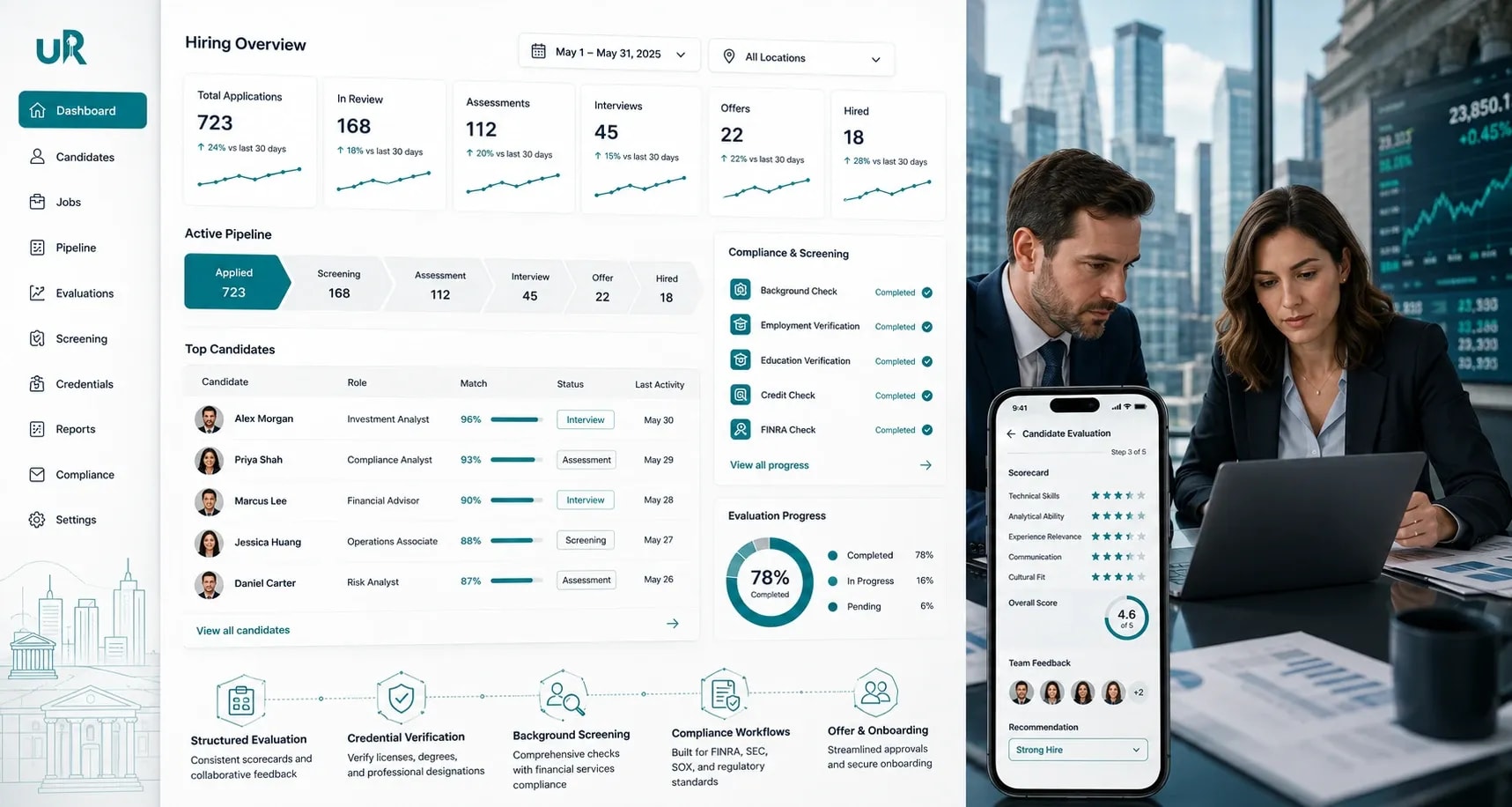
Hire FINRA Series 7/63, CPA, CFA certified professionals 30% faster with compliant workflows
Licenses and credentials
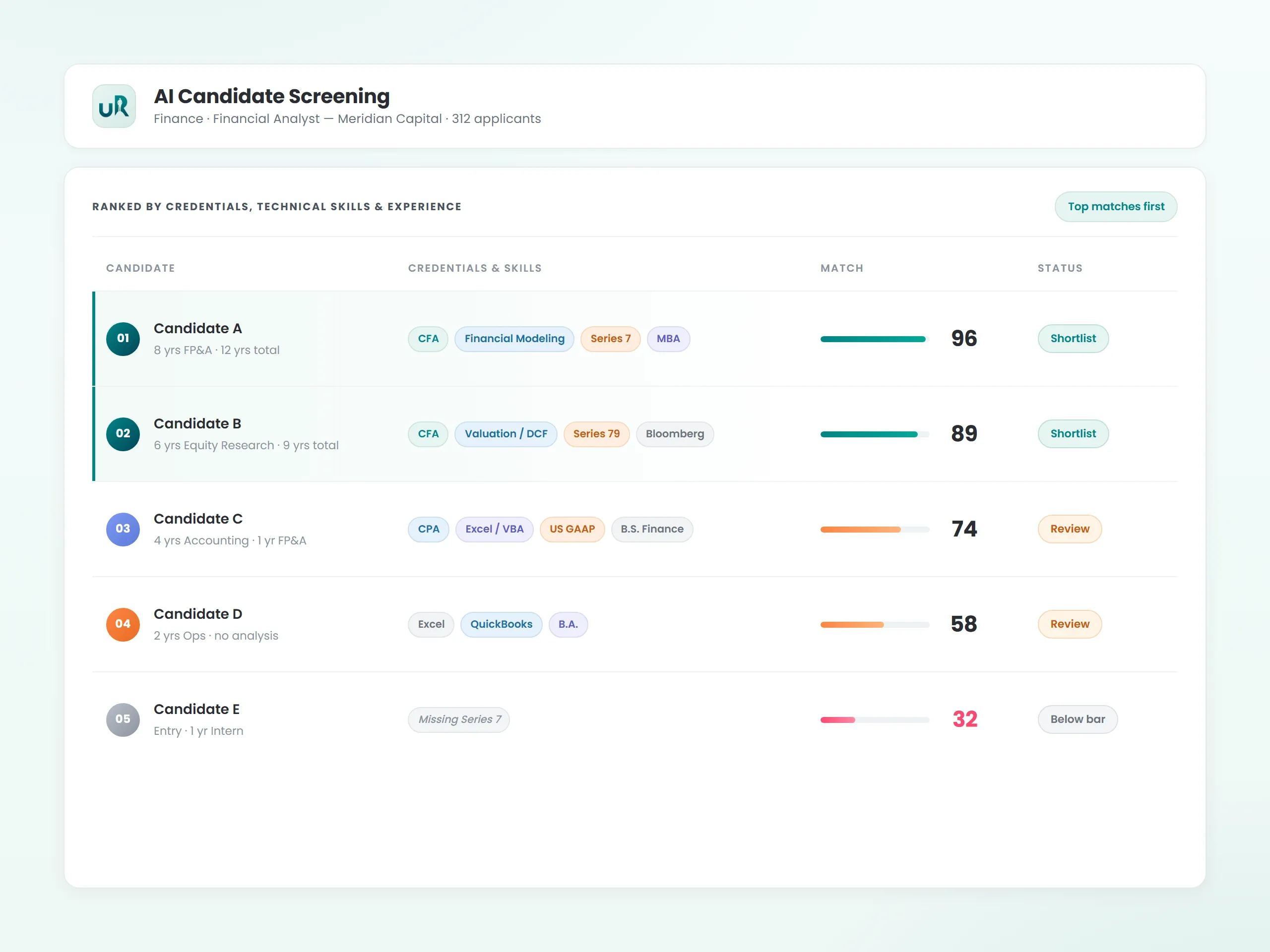
Extract licenses and credentials automatically from resumes instead of manual review
Background Screening
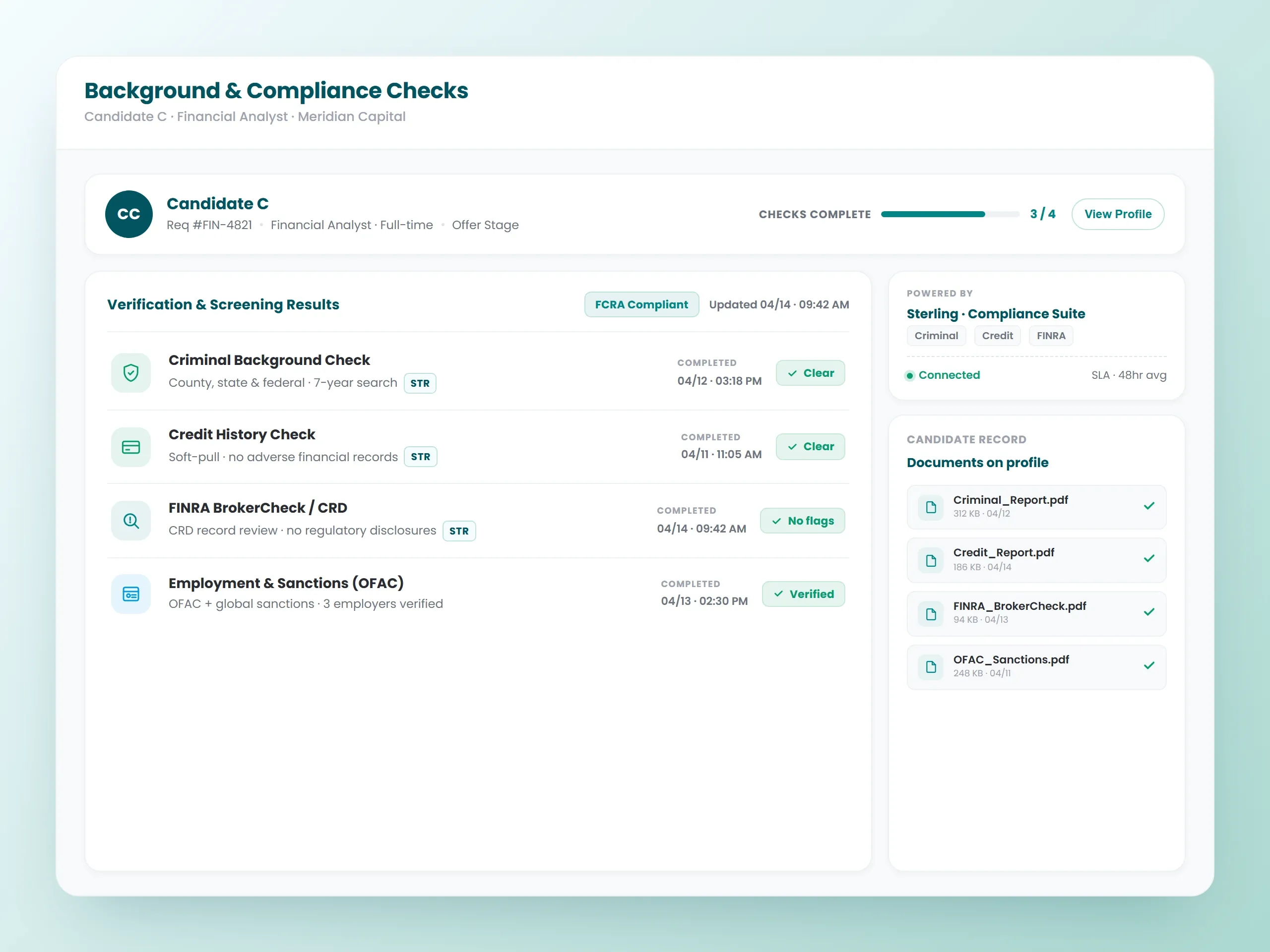
Complete background checks and verification through Universal Background Screening within your hiring process
Hiring decision
Document every hiring decision, credential check, and approval for regulatory audits
Hire risk
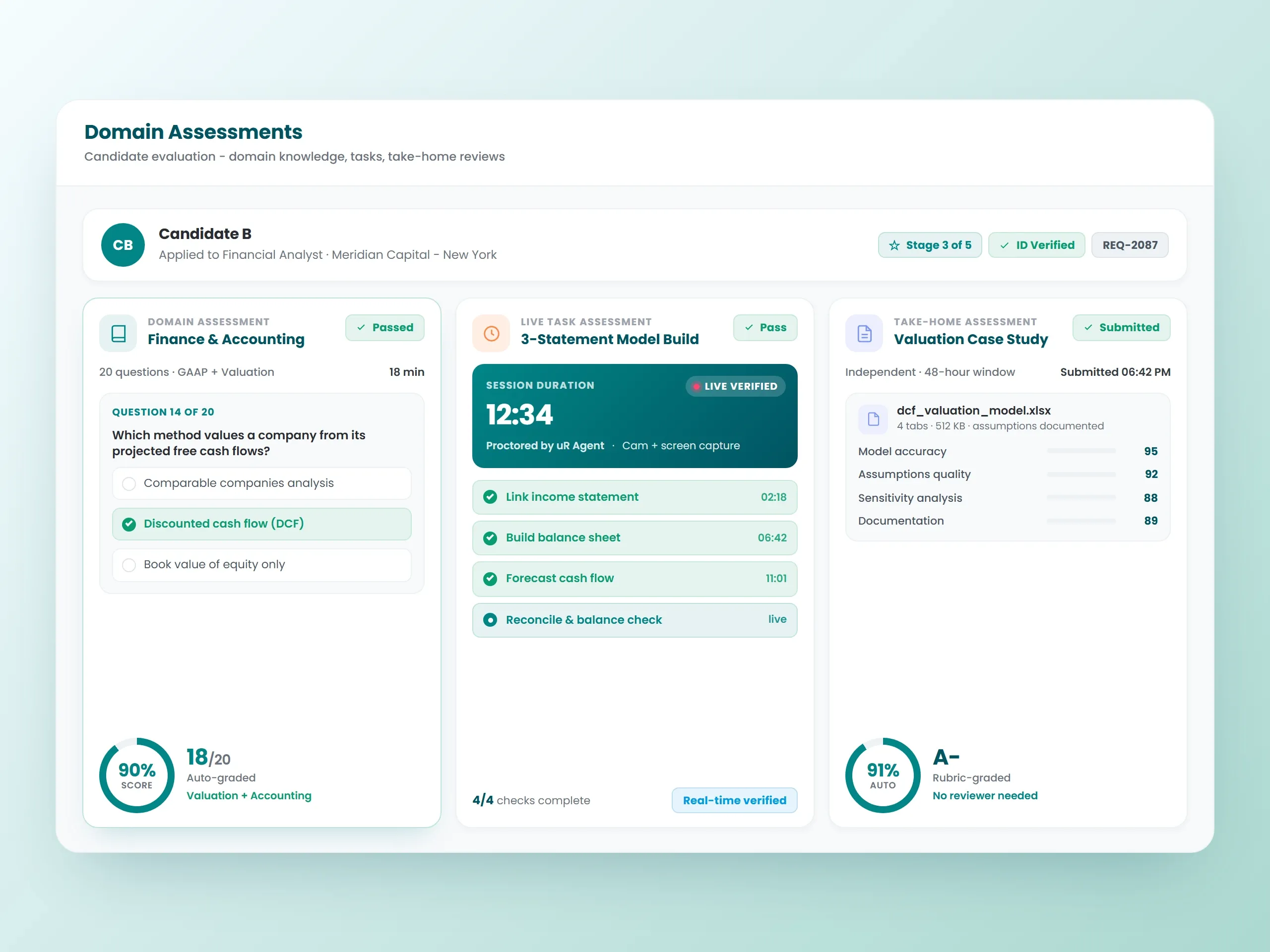
Reduce bad hire risk in regulated roles through structured assessments
Highlights of Financial ATS Software
Financial Recruitment Software Built for Regulated Hiring

Compete for Top Financial Talent in Regulated Environments
Qualified financial analysts, auditors, advisors, and compliance professionals get snatched up fast. While you're manually checking credentials and pushing candidates through multiple approval layers, competing firms are already extending offers. Our financial services applicant tracking system processes applications the minute they arrive, surfaces candidates with relevant certifications extracted from resumes, and moves them through structured hiring workflows before other organizations even schedule interviews. The high cost of bad hires in regulated financial environments makes speed and accuracy critical.
Structured Compliance Workflows Reduce Risk
Financial services hiring requires rigorous background checks, credential verification, regulatory clearances, and organized approval processes. Manual tracking creates bottlenecks and compliance gaps. uRecruits applicant tracking system for a financial services business integrates with Universal Background Screening to conduct criminal checks, verify employment and education, and coordinate drug testing within your workflows. The system documents verification activities and ensures every hire completes background screening before day one. Automation keeps checks and approvals on schedule, but HR, hiring managers, and compliance officers always review results and control final hiring decisions. Reduce compliance risk while accelerating hiring cycles.


How uRecruits executes compliant financial hiring
uRecruits brings three layers together for regulated financial services: the ATS serves as the compliance control plane and system of record for candidates, credentials, and approvals; assessments act as quality and risk gates for regulatory knowledge, analytical skills, and role fit; and AI-assisted coordination helps move candidates through defined workflows faster without bypassing approvals or controls.
Complete Financial Services Applicant Tracking System Features
Everything Financial Services Need to Hire with Confidence

Job Postings for Finance Roles
Write precise job descriptions for financial analysts, investment advisors, compliance officers, auditors, accountants, portfolio managers, risk analysts, tax specialists, and wealth managers in under 60 seconds using the AI Job Creation Agent. Our applicant tracking system for financial services understands industry credentials like FINRA Series licenses, CPA, CFA, CFP, and regulatory requirements. Post to uRecruits Job Marketplace, free job boards like Google For Jobs, and JobTarget (which reaches 22,000+ job boards at once). Cast a wider net to find credentialed professionals faster.

Career Pages and Mobile Experience
Financial professionals research employers carefully before they apply. Your career pages let candidates browse open positions by specialty, credential requirements, and location, then apply from any device. The mobile experience makes it simple for CPAs, CFAs, and licensed advisors to complete applications during their commute or between meetings without needing desktop access.

Resume Parsing and Credential Extraction
Sorting through hundreds of applications to find who holds active Series 7, CPA, or CFA credentials wastes valuable time. Our financial services applicant tracking system reads every resume and pulls out financial certifications, regulatory licenses, compliance training, relevant experience, and educational credentials. Candidates are organized by credential and experience requirements, making it easy to identify qualified financial professionals immediately.

Credential Organization and Structured Evaluation
Finding a financial analyst with specific modeling expertise or a compliance officer with multi-state regulatory knowledge can drag on for months. Our applicant tracking system for a financial services business helps you quickly identify candidates based on credentials extracted from resumes, right credentials, technical skills, regulatory knowledge, industry experience, and specialization. Organized candidate data lets you prioritize the most qualified financial professionals first, cutting time-to-fill for critical positions.

Technical Assessments
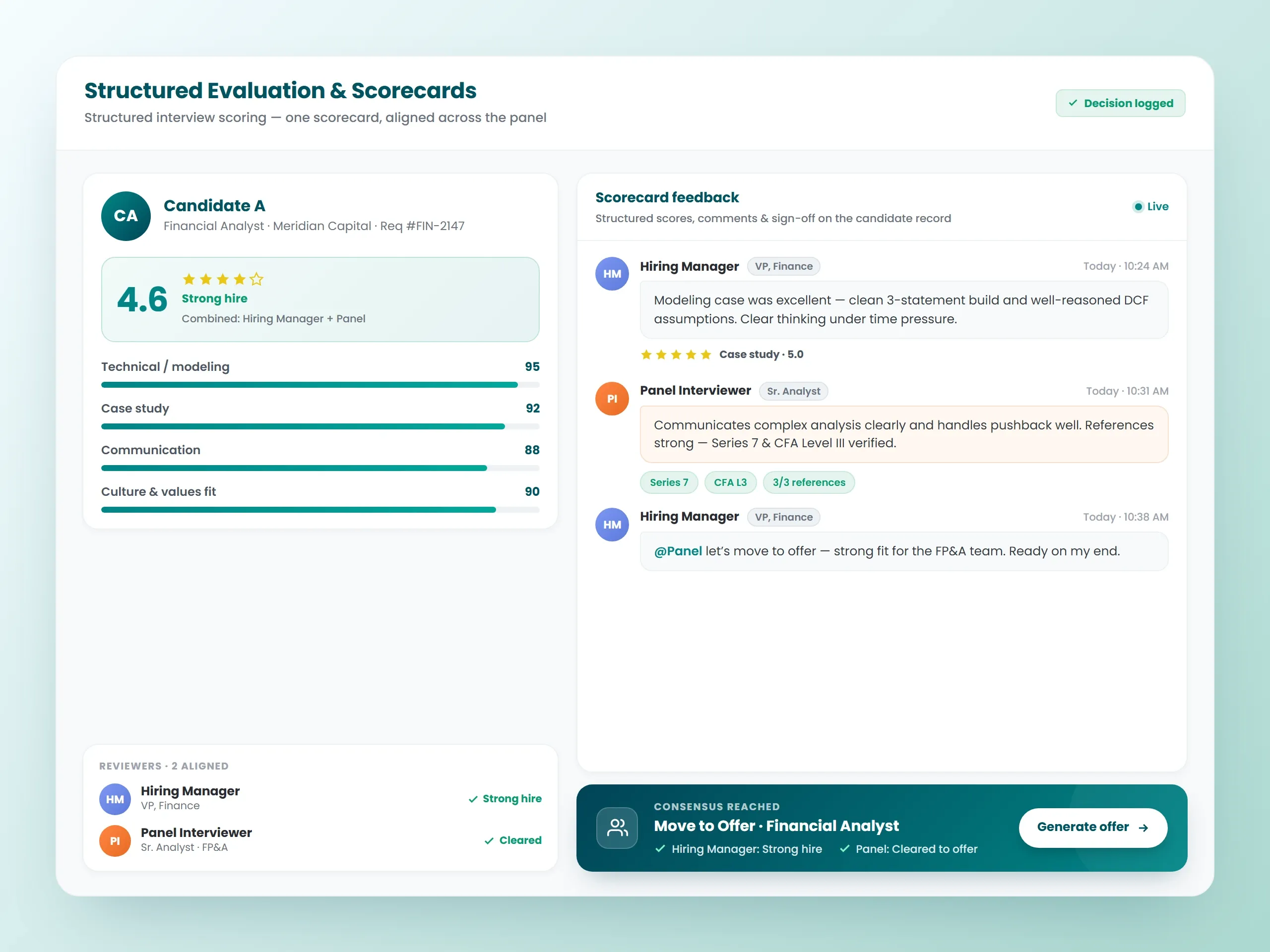
Different interviewers evaluating candidates inconsistently creates bias and slows decisions. Our financial recruitment software offers Functional/Domain Assessments to test regulatory knowledge and financial concepts, Live Task Assessments for real-time problem solving, and Take Home Assessments for financial modeling or analytical projects. Structured interview feedback combined with assessment results creates standardized evaluations and defensible hiring decisions. Everyone evaluates candidates using the same criteria, which speeds decisions, reduces bias, and helps you mitigate risk while identifying professionals who will deliver strong ROI.

Background Screening and Workflows
Build position workflows that trigger background checks, employment verification, and education verification at appropriate stages. Our financial services applicant tracking system integrates with Universal Background Screening to conduct criminal checks, verify employment history and education, and coordinate drug testing. Background screening results get documented within candidate profiles so you have verification records organized and accessible. Additional verification providers can be integrated based on your requirements.

Structured Interview Feedback
Stay compliant with fair hiring practices through structured interview scorecards and standardized evaluation criteria. The applicant tracking system for a financial services business ensures every candidate gets evaluated on the same competencies, reducing bias and documenting selection rationale. Structured feedback improves hiring quality and protects your organization during regulatory audits or equal employment inquiries.

Position Workflow Management
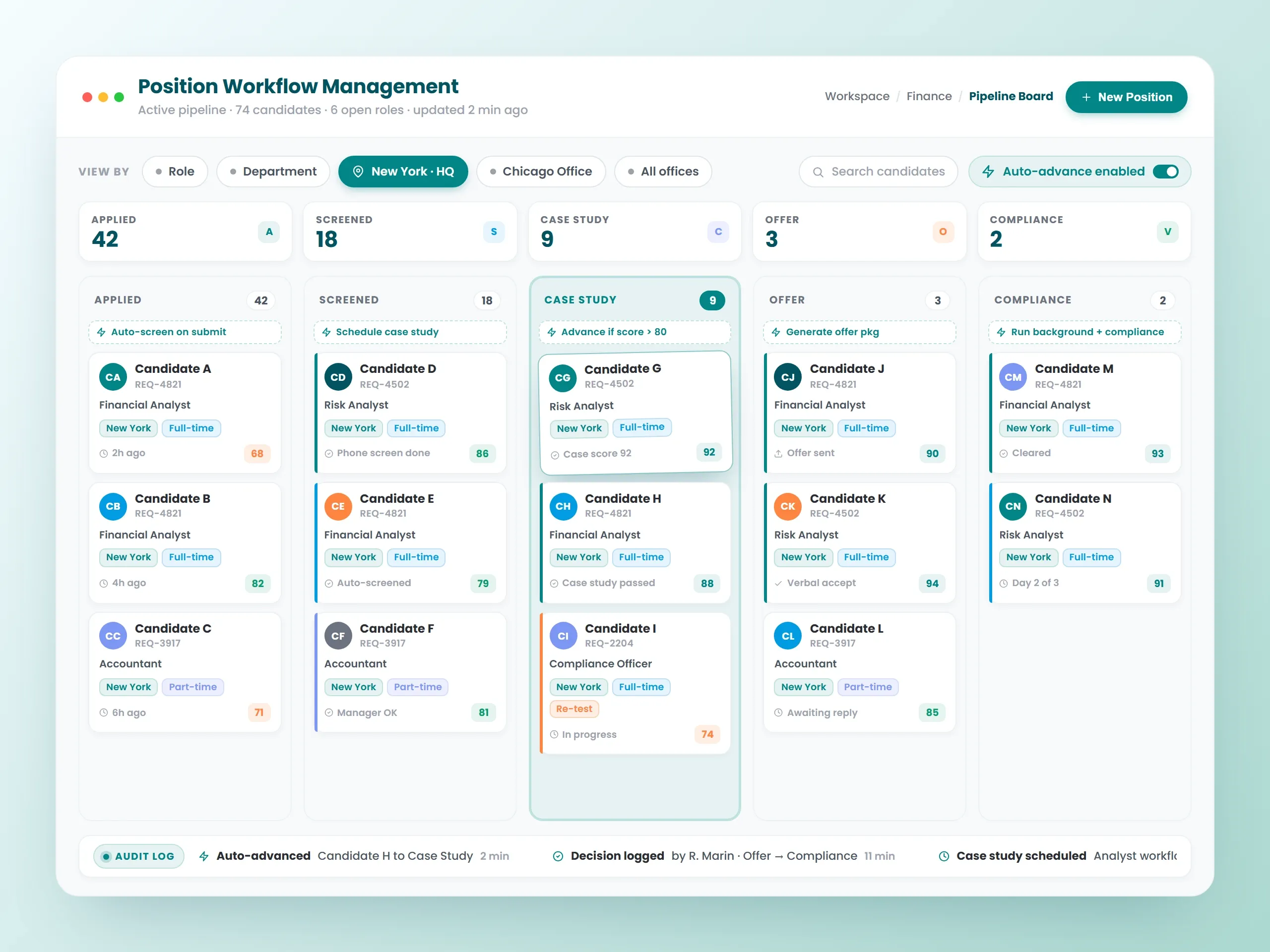
See your entire finance candidate pipeline on one screen organized by role, department, or position type. Move candidates through workflows including HR Audio/Video Interview for initial screening, Functional/Domain Assessment for knowledge verification, Live Task or Take Home Assessment for technical evaluation, Technical Audio/Video Round for deeper expertise review, Senior HR Audio/Video Round for leadership or client-facing fit, Conditional Offer Letter Generation, and Background Screening. Drag candidates as they progress through stages. Build separate workflows for client-facing roles (advisors, relationship managers) and back-office positions (analysts, compliance officers, operations staff). Track exactly where each candidate stands in your hiring process. Your ATS becomes the documented system of record for regulated hiring, so every candidate, credential, approval, and decision is captured in one place instead of scattered across emails and spreadsheets.

Analytics and Insights
Monitor job status and open positions, assessment report, background screening progress, interview activity, and offer distribution. Use financial recruitment software data to optimize your hiring budget and identify which credentials are hardest to source.
FAQs About Financial Services Applicant Tracking System
Some questions and answers
What is a financial services applicant tracking system?
How does an applicant tracking system for a financial services business help with credential tracking?
Can a financial services applicant tracking system manage structured hiring workflows?
How does an applicant tracking system for financial services reduce the cost of bad hires?
Does the applicant tracking system for financial services support both client-facing and back-office roles?
How does structured interview feedback improve compliance in financial services hiring?
How does a financial services applicant tracking system integrate with existing HR systems?
What reporting capabilities are available for compliance documentation?
How long does it take to implement a financial services applicant tracking system?
What results do financial services firms typically see with uRecruits?
Blogs

Top HR Technology Trends & Best Practices for 2026
The HR technology landscape is changing at a faster pace. In fact, global HR tech spending is expected to grow from USD 36 billion in 2024 to roughly USD 70 billion by 2033. The growth is driven by post-pandemic digital adoption, remote, and hybrid work models. It even demands data-driven decision-making.
What are the top HR technology trends for 2026?
The following HR technology trends highlights where HR leaders need to invest to improve recruiting efficiency, employee engagement, and compliance.1. Hyperautomation and Intelligent Screening
AI is becoming mature every day. More HR tasks are being automated. A study notes that “the tasks that can be automated, those should be.” It highlights hyperautomation as a key trend. AI chatbots improve employee experience by delivering information to the workers. They also provide HR teams with relevant data. Intelligent resume-parsing tools can sift through CVs depending on the experience and education. Those prioritize qualified candidates. With uRecruits, recruiters don't only use AI but Authentic AI. It actually thinks and acts on their behalf. It automates time-consuming tasks such as -- Sourcing
- Screening
- Candidate communication
2. Data-Driven Decision Making
Advanced analytics and machine learning allow HR teams to analyze large data sets and generate insights. The machine-learning models can identify which initiatives are more effective. You can then optimize workforce utilization and predict employee turnover. Enterprise HRM vendors are “beefing up” AI features to provide better people analytics. Best Practice You can invest in dashboards that provide real-time data on -- Hiring funnels
- Candidate quality
- Diversity metrics
- Cost-per-hire.
3. Skills-Based Talent Management
Skills validation and talent intelligence are rising priorities. Deloitte highlights that skill-based organizations drive positive workforce experiences. They focus on better outcomes when they centralize skills data and use objective measures to validate skills. HR leaders should inventory their current skills-validation approaches. They should also align on when and how to validate skills. Best Practice- Develop a single skill across the organization.
- Integrate data from assessments, performance reviews, & training.
- Use AI-based skills validation to match candidates with roles.
4. Hybrid & Remote Work Enablement
Hybrid work is the new norm. Research shows that 74% of the companies have adopted hybrid models or are moving toward one. Managing distributed teams across different locations and time zones requires scalable HR technology. Cloud-based HR platforms, remote desk-booking tools, and integrated databases help HR teams support remote employees. You need to know that outsourcing certain HR functions can free internal teams to focus on strategic work. Best practice You can invest in cloud-native HR systems. These allow employees to update their own data. They then submit time off and access learning resources from anywhere. It provides managers with tools to monitor remote productivity. Further, it balances monitoring with trust and respect for privacy.5. Employee Well-Being & Mental Health
Remote work has heightened attention on mental health. A survey of large employers found that 88% plan to offer online mental health resources. Many lower costs or provide manager training to support employee well-being. Telehealth and AI-based therapy platforms are gaining traction. Best practice It provides employees with access to mental-health resources. Along with counselling and wellness tools. You can create safe channels for employees to share concerns and use sentiment-analysis tools. These detect engagement and burnout. You can highlight these features in your marketing to showcase care for employees.6. Compliance & Ethical AI
Compliance requirements are becoming stricter with increasing dependency on AI. HR technologies should adhere to the rules and regulations, such as -- EEOC guidelines
- GDPR/CCPA data privacy rules
- New salary-transparency laws.
7. HR’s AI spending is growing fast
AI is quickly becoming the foundation of how HR teams work — helping them plan, make decisions, and deliver value. More than half of all companies (about 55%) are now increasing their HR tech budgets. By 2030, the market for AI in HR is expected to triple in size. Today, AI tools are being used for almost everything. It is from hiring and onboarding to tracking performance. Then, for training employees and planning the workforce. But as spending grows, so does the pressure to prove that this technology really makes a difference. Still, not every company is using AI the same way. Around 49% of HR teams use it for recruitment. However, fewer than 15% use it for things like performance reviews or employee development. The results also vary -- Top-performing companies see returns of 55% or more, while others get as little as 5%.
8. Human strengths will define HR’s future impact
AI takes on more technical and transactional work. And, the distinct value HR brings is increasingly rooted in human capabilities. Empathy, ethical judgment, communication, and culture-building are emerging as critical differentiators in workplaces. And the machines handle much of the routine. These human skills are not “nice to have” soft attributes, but are becoming essential. These guide organizations through change, maintaining trust, and sustaining culture in an era of rapid automation. The shift is already visible in the broader talent market. Nearly three in five employers say soft skills are more important today than they were five years ago. And, the demand for social and emotional skills is expected to grow by 26% by 2030. Within HR, it means capabilities like coaching, influencing, and emotional intelligence are moving from the sidelines to the core of what the function must deliver. These skills are especially important in moments of uncertainty, where HR is called on to guide leaders. They then support employees and hold space for complex conversations about change. Digital and analytical skills are rising in demand. However, emotional intelligence, adaptability, and influence are now just as important for HR professionals who want to remain credible, trusted, and effective. As businesses change, HR will increasingly be expected to put human skills into daily practices. They model them for the broader organization. HR professionals must invest in their own development, actively building skills like -- Empathy
- Coaching
- Trust-building
- Ethical judgment.
Finally…
HR leaders face unprecedented complexity. However, it comes with an amazing opportunity. When you use the above-discussed HR technology trends, the organizations can transform HR from an administrative function to a strategic powerhouse. uRecruits’ agentic AI recruitment platform is built to support the transformation. It helps HR teams move faster, hire smart, and foster a culture of fairness and belonging.
Written by
Thomas Alexander
Admin

Top 10 ATS Features Every Recruiter Needs in 2026
Recruiters in 2026 don't just need another ATS. They need a recruitment command center. It should be AI-smart, intuitive, automated, and built for speed and better candidate experience. But most guides still tell you to "track applicants" or "parse resumes." Those sounds like you are still recruiting in 2015. Well, let's get out of those old sayings, and know the real top 10 ATS features that make or break a hiring team in 2026.
Features
Why ATS?
In 2026, hiring without an ATS means looking for something blindfolded. Today's recruiters manage about hundreds of resumes, collaborate with multiple stakeholders, and expect to move fast. They do it all while delivering a great candidate experience. A modern ATS centralizes your entire recruitment process. It automates repetitive tasks and helps you screen smarter with AI. It keeps everyone on the same page. It's not just about tracking applicants, but about making better hires, faster, and with confidence. A modern ATS streamlines the entire hiring process - from job posting and AI-powered resume screening to interview scheduling, DEI tracking, and offer management. It centralizes every touchpoint, saves recruiters hours per hire, and ensures no great candidate slips through the cracks.What Are Its Features?
1. AI-Powered Resume Ranking
Recruiters waste hours manually screening resumes. Even 80% of them get rejected at first glance. AI resume ranking solves it by scoring candidates depending on the skills and experience.What To Look For -
- Skill-based matching
- Transparent scoring logic
- Ability to adjust scoring weights.
Smart Tip
Choose an ATS where you control the AI, you can even make changes in the role with the evolution.2. Real-time Candidate Collaboration
2026 hiring is all about team work. There are hiring managers, HRs, tech leads, and even founders involved. Everyone needs to be in sync. You need to look for -- Slack/Team-style commenting on candidates profiles.
- Tag teammates directly.
- Check action history.
3. Smart JD Generator
A poorly written job description means fewer quality applicants. A smart ATS should help you write better and faster. Must-haves -- AI-generated job descriptions.
- Keyword optimization for SEO and Job board rankings.
- Tone customization.
4. Talent Rediscovery Engine
You already have a goldmine in your database. The right ATS helps you re-engage past applicants who almost made it. Top Capabilities- Tagging and segmenting past candidates.
- Auto-matching old profiles with the new jobs.
- 1 Click re-invite to apply.
Smart Tip
Your sourcing cost can drop dramatically when you tap into people who already know about your brand.5. DEI Analytics Dashboard
Diversity is not an option anymore - it's a hiring KPI. Your ATS helps track DEI goals without bias. Must-have metrics -- Gender, ethnicity, veteran status filters.
- Funnel drop-off demographics.
- Bias detection in the job ads and interview feedback.
Smart Tip
Choose a platform that chooses candidate profiles early by removing unconscious bias.6. Automated Interview Workflow
Interview coordination is a scheduling nightmare. However, the right ATS automates it all. Features- Calendar integrations.
- Auto-send interview invites and reminders
- Collect structured feedback post-interview.
Smart Tip
Look for ATS platforms that suggest ideal interview panels depending on the role requirements.7. Offer Management And E-Signatures
Top candidates don't wait. The faster you send the offer, the better your chances become to win. Must-have tools -- Auto-generated offer letters
- In-app approvals.
- Built-in e-sign
Smart Tip
Choose a platform with salary benchmarking tools. It makes your offer fast and smart.8. Multi-channel Sourcing Integrations
Modern talent hangs everywhere - not just LinkedIn. Must-haves- Chrome sourcing extensions.
- Direct integrations with niche job boards.
- Unified inbox for every candidate source.
9. Built-in Candidate CRM
Passive candidates are 70% of the talent pool. You need tools to nurture them without losing them to your competitors. Top Features -- Custom pipelines for warm leads.
- Drip email campaigns and reminders.
- Engagement analytics.
Smart Tip
Use ATSs that lead you segment by interest, skillset, or stage. And, also the personal outreach.10. Role-based Hiring Permissions
Hiring is not just HRs job anymore. But not everyone should see everything. You need to look for -- Custom roles.
- Access restrictions.
- Audit logs for accountability.
Smart Tip
Avoid security risks by using ATSs with 2FA and GDPR compliance for user access control.Finally…
In 2026, an ATS is not just a tool, but a central nervous system of your recruitment. So, don't just settle for one that just "tracks applicants." Go for one that thinks with you, speeds up your process even faster, gives you the needed superpower, and makes candidates love your brand.Frequently Asked Questions
Do I need AI in my ATS in 2026?
Yes, but only if it is customizable. You can adjust how it ranks and filters candidates.Can ATS help with DEI goals?
Yes. Many now come with DEI dashboards, different profiles, and bias checkers for JDs.What if I have a small hiring team?
Even solo recruiters can benefit from the features like JD generation, automation, and CRM tools.Is uRecruits a good option?
If you are looking for next-gen automation, easy collaboration, and smart sourcing, uRecruits is one of the strongest platforms to consider.Written by
Author

The Value of HR Analytics Tools: Key Features for 2026
HR analytics helps HR teams use data to make smarter decisions that directly impact a company’s growth and success. In fact, more than 70% of business leaders say people analytics is one of their top priorities. The HR analytics industry itself is booming, expected to grow at a CAGR 14.8% and reach $8.59 billion by 2030. If your HR department isn’t using HR analytics to improve efficiency, your business could fall behind while others invest in digital tools and move ahead. Here is a quick refresher on what HR analytics is and the biggest benefits it can bring to your business.
What is HR Analytics?
HR analytics is all about using data to understand your workforce. Most importantly, how your organization is performing. HR teams can know problem areas and take steps to fix them when they track key numbers and trends. It can lead to -- higher efficiency
- better productivity
- stronger employee retention
- more effective training, and
- overall business growth
What Are The Different Types Of HR Analytics?
HR analytics helps HR professionals make smarter, data-driven decisions. It also gives HR teams the chance to play a more strategic role. The entire thing is done by providing insights that directly support business growth. To do this, HR can use four main types of analytics:- descriptive
- diagnostic
- predictive, and
- prescriptive
# 1. Descriptive Analytics
Descriptive analytics is the starting point of HR analytics. It looks at past data to explain what happened in the organization. You can consider it as looking in the rearview mirror. It summarizes trends and patterns but doesn’t predict the future. The type of analysis is sometimes called decision analytics. It uses statistical methods to make sense of historical data. HR teams might calculate -- averages
- ranges
- rankings, or
- spot variations
- Average absenteeism or PTO days
- Variations in performance scores across teams
- Frequency of turnover events
- Simple to use and understand
- It needs only basic math
- It makes complex data easy to present
- Only look at “what” happened, not “why” or “how.”
- Limited in scope
- It doesn’t provide deeper explanations or predictions
2. Diagnostic Analytics
Diagnostic analytics goes a step beyond descriptive analytics.- The descriptive analytics shows what happened and
- diagnostic analytics explains why it happened.
- trends
- anomalies, or
- correlations
- Spotting patterns. Then, anomalies in the data
- Investigating what factors might be influencing those trends
- Using statistical methods. It determines cause-and-effect relationships
- Data drilling: Zooming in from general data to detailed insights
- Data mining: Discovering patterns that may predict future outcomes
- Probability theory: Measuring uncertainty in events
- Regression analysis: Finding which variables affect outcomes
- Correlation analysis: Testing relationships between factors
- Statistical analysis: Interpreting data to uncover hidden patterns
- Provides deeper insights into the reasons behind data trends.
- Helps HR make more informed decisions.
- Still reactive
- It focuses only on past events
- Doesn’t always give clear, forward-looking actions for planning
3. Predictive Analytics
Predictive analytics uses past and present HR data to forecast future outcomes. HR leaders can make smarter decisions about -- hiring,
- training, and
- retaining top talent
- job skills
- engagement levels
- productivity, and
- resumes
- Collecting and then categorizing past and current data
- Identifying any patterns, correlations, and irregularities
- Building a model. It predicts future events
- Testing and refining the model. It ensures accuracy as new data comes in
- It reduces human error in decision-making
- It helps organizations avoid risks and improve efficiency
- It provides more accurate workforce forecasts
- It needs large and reliable data sets.
- It is hard to account for every variable that could influence outcomes
- The models must be updated regularly to stay relevant
4. Prescriptive Analytics
Prescriptive analytics is the most advanced stage of HR analytics. While predictive analytics tells you what might happen, prescriptive analytics goes one step further to suggest what you should do about it. In simple terms, it turns predictions into targeted recommendations. It helps HR leaders choose the best actions to -- solve problems
- improve performance, and
- drive success
- Think of prescriptive analytics like Netflix recommendations.
- Just as Netflix suggests movies based on your viewing habits, prescriptive analytics suggests actions based on patterns in your HR data.
- Predictive analytics shows the likely outcomes.
- Prescriptive analytics shows not only the outcomes but also the steps you can take to influence them.
- Machine learning
- Algorithms
- Artificial intelligence
- Pattern recognition
- It helps HR make smarter, real-time decisions
- It solves complex problems and highlights new opportunities
- It can suggest strategies, such as targeted training programs, to boost productivity
- It relies heavily on the quality and completeness of data
- It can be time-consuming since it’s an ongoing process
- The recommendations may not always capture the human side of HR. The algorithms can miss nuance
- HR leaders still need to carefully weigh which actions are practical and ethical
What is an HR Analytics Tool?
An HR analytics tool is software that collects and analyzes employee and workforce data to provide useful insights. Many of these tools also let you create reports and visual dashboards so you can clearly see what’s happening in your organization. These tools are a must-have for HR teams. Doing HR analytics manually is not only time-consuming but also prone to errors. A very small business with just one or two employees can manage without one. However, any organization beyond that will need an HR analytics tool to get accurate, reliable results.What Are Some Types Of HR Analytics Tools?
1. uRecruits
uRecruits is an AI-powered HR analytics software that turns raw HR data into clear, decision-ready insights. It helps HR teams stay a step ahead—boosting efficiency, sharpening talent strategies, and analyzing performance at every level. Top Features- Predictive Workforce Analytics: Forecast hiring needs, surface talent gaps, and act before challenges arise.
- Skills Mapping & Development Analytics: See capabilities across teams and align training, promotions, and growth with business goals
- DEI (Diversity, Equity & Inclusion) Analytics: Track DEI metrics, spot gaps, monitor progress, and build a fair, inclusive workplace
- Recruiter Scorecards: Measure sourcing efficiency, interview turnaround, offer acceptance, and candidate satisfaction to enable focused coaching
- Employee Experience Analytics: Understand retention drivers, reduce churn, and track engagement and real-time performance
- Ethical & Responsible AI: Privacy-respecting, transparent insights that support trustworthy, explainable decisions
- Truly end-to-end analytics and action platform
- Reduces HR busywork by 60% through automation
- Predictive + prescriptive intelligence built in
- Clear DEI tracking and recruiter performance transparency
- HR knows what to do next
- Scales for SMEs and large enterprises alike
2. Personio
Personio is a GDPR-compliant HR analytics platform. It gives you insights across -- onboarding, payroll
- employee performance, and
- more
- Track and filter employee data for detailed KPI analysis.
- Use charts and tables for quick insights
- Create your own reports or use predefined templates
- Protect sensitive data with secure permissions
- Easy to use.
- Detailed insights across HR functions
- Flexible and customizable reports
- Best suited for European and UK markets
- It may be less optimized elsewhere
3. Visier
Visier is built for enterprise-level organizations and specializes in people analytics. It pulls data from multiple HR systems like -- HRIS and
- ATS.
- productivity shifts.
- Sophisticated
- more expensive and
- complex for teams new to analytics
- It combines HR data from multiple sources into one view
- Forecasts different trends like turnover or performance issues
- Save time with ready-made analytics and benchmarks
- Deep, enterprise-grade people analytics
- Benchmarking tools to compare against industry peers
- Robust integration across HR systems
- Higher cost compared to other solutions
- Some users report a steep learning curve
- Requires additional HR tools for a complete system
4. PeopleForce
PeopleForce offers a CoreHR solution. It centralizes all employee information for easier access. It also helps track engagement with pulse surveys and eNPS (Employee Net Promoter Score).- Custom reporting lets HR teams build tailored insights to fit their needs.
- It’s popular among small to mid-sized businesses. But some users note limited customization compared to larger platforms.
- Keep all employee info in one place
- Build tailored reports for different HR needs
- Use surveys and feedback tools to measure satisfaction
- Fully synced with the web version for on-the-go access
- Mobile-friendly
- Easy to use
- Good engagement tracking tools
- Affordable option for smaller companies
- Some advanced features are missing
- Limited customization options
5. HiBob
HiBob helps HR teams track and analyze workforce trends. It is done with real-time dashboards. It offers -- engagement surveys
- feedback tools, and
- both pre-built and customizable reports for deeper analysis
- Track metrics like retention, absenteeism, and more
- Spot workforce trends automatically
- Identify employees most at risk of leaving
- Strong employee data tracking tools
- Real-time dashboards for instant insights
- Pre-built reports available
- Some features are limited or missing
- May not fully meet the needs of very large organizations
6. ADP DataCloud
ADP DataCloud is a cloud-based HR analytics tool that helps organizations use their workforce data to make smarter decisions. It is about -- talent
- payroll, and
- operations
- Custom reports and insights on workforce trends
- Real-time dashboards for performance management
- Tools to analyze employee turnover and create retention strategies
- Forecasting tools for workforce planning and budgeting
- Smooth integration with ADP’s payroll and HR systems
- Works with ADP payroll and HR products
- Easy-to-use interface with clear, actionable insights
- Provides real-time analytics to support decision-making
- Works best for businesses already using ADP services
- Customization options are limited compared to standalone analytics tools
- Expensive for smaller businesses with tighter budgets
7. IBM Watson Talent Analytics
IBM Watson Talent Analytics is an advanced HR analytics platform. It is powered by AI and machine learning. It helps companies -- improve recruitment
- monitor employee performance, and
- plan workforce needs through data-driven insights
- AI-powered predictive analytics to improve hiring and reduce turnover.
- Deep insights into employee behavior and performance
- Recruitment analytics to make hiring more efficient
- Smooth integration with existing HR software
- Customizable reports and data visualizations
- Natural language processing (NLP) to analyze employee feedback
- Provides cutting-edge, AI-driven workforce insights
- Advanced tools to optimize recruitment strategies
- Flexible and scalable, integrates with multiple HR systems
- Needs expertise to get the best results
- High costs may not suit smaller businesses or startups
- Setup and implementation can be complex
8. Workday
Workday is a comprehensive HR platform that combines human capital management (HCM) and analytics.- It offers tools for
- recruitment
- payroll
- talent management, and
- workforce planning
- All-in-one HR management
- Real-time analytics for smarter decisions
- Workforce planning and forecasting tools
- Integration with performance management systems
- Employee engagement and sentiment analysis surveys
- Wide range of features
- It is suitable for large organizations
- User-friendly design and intuitive navigation
- Too costly for small and mid-sized businesses
- Requires training for new users to fully utilize
- Some users report slower data processing at peak times
- Tableau
- employee engagement
- performance, and
- retention
- Interactive dashboards for HR data and KPIs
- Real-time, customizable visual reports
- AI and machine learning integration for predictive insights
- Connects seamlessly with multiple HR data sources
- Collaboration tools to share insights across teams
- Strong filtering and data manipulation options
- Excellent data visualization capabilities
- Easily connects with a wide range of data sources
- Highly flexible and customizable for specific business needs
- Requires a steep learning curve for beginners
- High licensing costs for full functionality
- Not a complete HR system. It focuses mainly on data visualization
Finally…
HR analytics is no longer a “nice-to-have.” It’s a must-have for modern organizations. The right analytics tool can turn raw data into powerful insights for -- improving hiring decisions
- boosting retention
- productivity, and
- workforce planning
Frequently Asked Questions
How is HR analytics different from traditional HR reporting?
Traditional HR reporting focuses on “what happened.” E.g., number of hires or resignations. HR analytics goes a step further to explain “why it happened.” It even predicts “what might happen next.”Do small businesses need HR analytics tools?
Yes. The very small teams might manage without them as soon as a company scales beyond a handful of employees. HR analytics tools become essential to avoid errors and save time.What challenges do companies face with HR analytics?
Challenges often include -- poor data quality
- lack of expertise
- Resistance
- adopting new tools, and
- high costs for advanced platforms
Can HR analytics predict employee turnover?
Yes. Predictive analytics can help identify patterns. Those include low engagement, missed promotions, or pay disparities. These often lead to resignations.
Written by
Thomas Alexander
Admin